I've seen the Block Until Done tool used in the past to prioritize writing to an Excel workbook from 2 data streams, but I can't get this one to work.
As per this workflow:
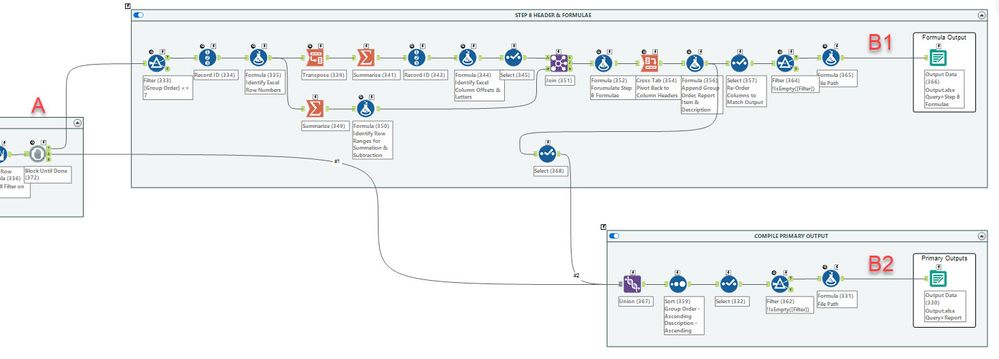
I currently have one Block Until Done at point A, and I'm only getting the "Report" sheet created in the Excel, which is labelled under Primary Outputs beside B2. If I disable that container, the Formula Output will create a sheet called "Step 8 Formulae" beside B1, as desired. I'm just not able to populate the Excel with both sheets when both containers are enabled. What am I missing?
The Results table says both outputs are created and written, but only the Report sheet exists at the end:

Do I instead need to drop a Block Until Done at both points B1 and B2? I've read the documentation in Designer for Block Until Done, but there's no illustration, so I'm a bit confused on how to properly insert it into the workflow.
Thanks,
Jeff


