In case you missed the announcement: The Alteryx One Fall Release is here! Learn more about the new features and capabilities here
ACT NOW: The Alteryx team will be retiring support for Community account recovery and Community email-change requests Early 2026. Make sure to check your account preferences in my.alteryx.com to make sure you have filled out your security questions. Learn more here
Start Free Trial

Alteryx Designer Desktop Discussions

Find answers, ask questions, and share expertise about Alteryx Designer Desktop and Intelligence Suite.
SOLVED

Why is my IF statement malformed?

Carluccio555
9 - Comet

I literally copied a working formula tool from one workflow to another and now my if statement is malformed.


When I try retyping the expression from scratch I get this far:



image.png

then when I add the endif the expression shows as malformed:

 

image.png


Here is the exact same expression working fine in another workflow:
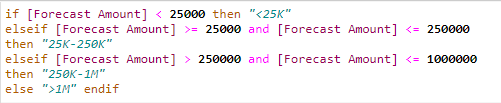
 

image.png


Am i missing somethin?


Thanks


2 REPLIES 2
TimN
13 - Pulsar

One thing to check is the data type of Forecast Amount in the second WF.

cjaneczko
13 - Pulsar

The formula looks fine. Check your data types, the Forecast Amount should be Double and your field that the formula is in should be a String format.

Labels
Top Solution Authors