In case you missed the announcement: The Alteryx One Fall Release is here! Learn more about the new features and capabilities here
ACT NOW: The Alteryx team will be retiring support for Community account recovery and Community email-change requests Early 2026. Make sure to check your account preferences in my.alteryx.com to make sure you have filled out your security questions. Learn more here
Start Free Trial

Alteryx Designer Desktop Discussions

Find answers, ask questions, and share expertise about Alteryx Designer Desktop and Intelligence Suite.
SOLVED

Why do I get an error if I output one record and get no error if I output two records.

mutuelinvestor
8 - Asteroid

I'm working on a workflow that inserts a record into an Azure SQL database. When I try to insert a single record, I get the following error. Duplicate Key Was Ignored.  Insert into [...].


When I run the same workflow but insert two records (the exact same reocords) everything works perfrectly and I get now errors.  


In the case of two records, I'm using the two follow records:

Capture2.PNG


In the case of one record, I'm using the following record. 

Capture1.PNG


Here are the results I get from my workflows
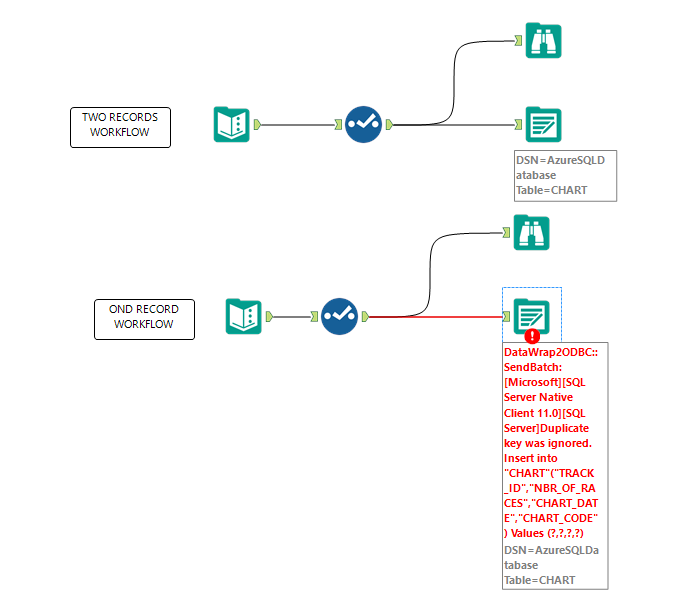
 

CaptureR.PNG


Each of the output tools are configure identically as follows:
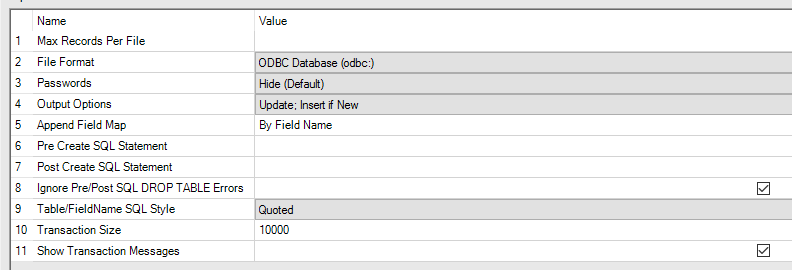
 

Capture4.PNG


Has anyone seen something simlar to this.  Is this a bug or am I missing something obvious?  I appreciate any thoughts or ideas you have.  


Thanks,

Jim 


2 REPLIES 2
andrewdatakim
12 - Quasar
12 - Quasar

I am not sure of the underline cause but have you tried using a dummy record to bypass having a single record? This will at least get your workflow runing until someone can come up with a solution.

mutuelinvestor
8 - Asteroid

Andrew thank for the reply.  You suggested is actually part of the solution that I finally did come up with. 


Several issues were contributing to my problem, most of them related to how I created my SQL table.


1. My first mistake was when creating my primary key I used a seed value of zeror (0) instead of (1) as a result when I was trying to use Update /Insert if New and using a zero-value for the Id I was getting a duplicate primary key.   

    So now I'm using [Id] [bigint] IDENTITY(1,1) NOT NULL instead of [Id] [bigint] IDENTITY(0,1) NOT NULL,


2. Secondly, when I defining your primary key contraint, you have the option of IGNORING DUP KEYS.

 CONSTRAINT [PK_CHART] PRIMARY KEY CLUSTERED 
(
[RACE_Id] ASC
)WITH (PAD_INDEX = OFF, STATISTICS_NORECOMPUTE = OFF, IGNORE_DUP_KEY = OFF, ALLOW_ROW_LOCKS = ON, ALLOW_PAGE_LOCKS = ON)
)
 
3.  Finally, per Andrew's suggestion I also used a dummy record to bypass the single record issue. 
Labels
Top Solution Authors