In case you missed the announcement: The Alteryx One Fall Release is here! Learn more about the new features and capabilities here
ACT NOW: The Alteryx team will be retiring support for Community account recovery and Community email-change requests Early 2026. Make sure to check your account preferences in my.alteryx.com to make sure you have filled out your security questions. Learn more here
Start Free Trial

Alteryx Designer Desktop Discussions

Find answers, ask questions, and share expertise about Alteryx Designer Desktop and Intelligence Suite.
SOLVED

Using Regex Replace to get different parts of a string

andreahq
7 - Meteor

Hi,


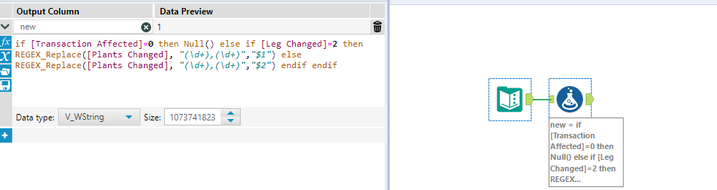
I'm trying to use the REGEX_Replace formula to extract a specific section of a string if a condition is met. I'm using the formula below which I saw in a different forum but for some reason is not working: REGEX_Replace([Plants Changed], "(\d+),(\d+)","$2")


Source:
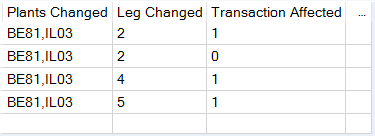
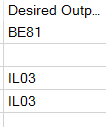
andreahq_0-1604680238489.png


Desired Output vs Current Output:

andreahq_1-1604680292087.png

andreahq_3-1604680422338.png


Workflow:

andreahq_2-1604680328990.png


1 REPLY 1
messi007
15 - Aurora
15 - Aurora

Hello @andreahq ,


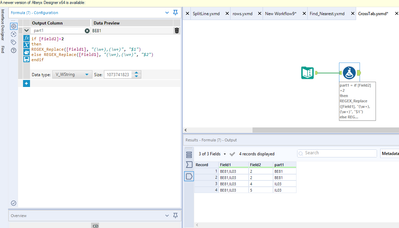
You have to change the \d to \w.


if [Field2]=2
then
REGEX_Replace([Field1], "(\w+),(\w+)", "$1")
else REGEX_Replace([Field1], "(\w+),(\w+)", "$2")
endif


Below the a simple test I have done


messi007_0-1604681319734.png

Hope that Helps 🙂 

Regards,

Labels
Top Solution Authors