cancel
Showing results for 
Search instead for 
Did you mean: 

Unable to open file for write

SOLVED
linlysergel
Meteor

Unable to open file for write

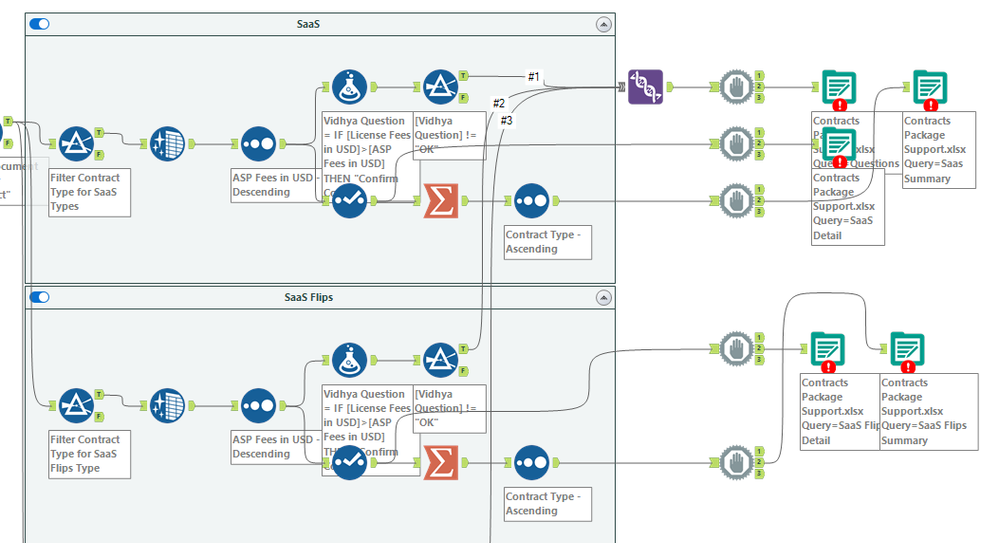
On many of my workflows, I keep getting the "Unable to open for write [...] The process cannot access the file because it is being used by another process (32)." when I try to write multiple tabs to the same Excel workbook.


I've tried strategically dropping my tools so that they all have sequential IDs, using the block until done tool (which I clearly don't know how to use properly), and even a parallel block on another workflow.  What am I doing wrong?
 

Contracts Package.PNG

Attachment
Download this attachment
10 REPLIES 10
linlysergel
Meteor

Unable to open file for write

On many of my workflows, I keep getting the "Unable to open for write [...] The process cannot access the file because it is being used by another process (32)." when I try to write multiple tabs to the same Excel workbook.


I've tried strategically dropping my tools so that they all have sequential IDs, using the block until done tool (which I clearly don't know how to use properly), and even a parallel block on another workflow.  What am I doing wrong?


Contracts Package.PNG

Attachment
Download this attachment
ShankerV
Castor

Re: Unable to open file for write

Hi @linlysergel 


I see you are trying to write the same file Contracts Package.

Where you have used 5 Block until done. Where all are trying to write the write the file at same time.


Thats why it is throwing the error.


Re: Unable to open file for write

Hey @ShankerV,


That makes sense, but I can't visualize how I would fix it since I can't do more than a single input on the Block tool and my attempt at a Parallel Block also failed.  Any ideas?

ShankerV
Castor

Re: Unable to open file for write

@linlysergel 


Trying to run the workflow to fix with alternative method, give me few seconds.

frank_sanseri
Alteryx

Re: Unable to open file for write

In order for Block Until Done (BUD) to actually block, you need to use the sequential outputs in the tool itself.  So your first action exits anchor 1, and the flow will wait until anchor 1 is done before initiating anchor 2.  Once anchor 2 is done, anchor 3 will start.  You can waterfall from each anchor on a BUD to another if you need to.  Using several individual tools like you've shown won't produce any blocking actions. 


Please be sure to mark this as solved if any of these answers work. 

ShankerV
Castor

Re: Unable to open file for write

Hi @linlysergel 


Before:

ShankerV_0-1670600166812.png


After correction:

ShankerV_1-1670600280223.png

By this way, it will write the file first.

Then will do the Summarize and do the writing in the same file.


Requesting to do the same for all the block until done, when 2 nodes are used. You can use the 3rd node to connect to another Block until done to make the workflow running.

Like below:

ShankerV_2-1670600418569.png


Hope it helps!!!! Hope your issue is resolved. Feel free to mark helpful answers as a solution, so that future users with the same issue can find them easier!!!!


Many thanks

Shanker V

linlysergel
Meteor

Re: Unable to open file for write

@ShankerV This makes so much more sense, thank you for the example!  It really helps to see it in on a workflow I've built versus one of the tool example/instruction workflows.

Re: Unable to open file for write

@linlysergel 


Glad my example helped, so used a live solution which will help, happy to support at any time

Re: Unable to open file for write

Hi Shanker,


Thanks for your help it is working with this logic.

Sorry I can't share my workflow because my company has restrictions on sharing.


Thanks and Regards

Reeta Gour

Highlighted
PanPP
Alteryx Alumni (Retired)

Re: Unable to open file for write

Hi @VaishnaviGinni 


When using the Block Until Done tool, make sure the tool is dragged first onto the Designer canvas before dragging in the output tools.


When using the block until done tool, the order in which the tools are placed in the workflow matter.


Hope this helps! Please like the post if it does.