Hello,
First off I want to say thank you to everyone's contributions. I am new to Alteryx, having been working with the software for about 3 days now.
I'm having trouble connecting to some URLs, and was hoping someone with more experience might be able to shed light on these.
I have looked through the community extensively, and haven't seen exactly what I'm caught up on.
jamielaird for his response to another tread, that has been very helpful.
https://community.alteryx.com/t5/Alteryx-Designer-Discussions/Downloading-Excel-File-from-a-URL/m-p/398897#M73300
If works for most of the formats I have used in excel so far. I just modify the file name extension - csv, xls, xlsx on the text import and dynamic input data source template. .temp\csv or .\temp.xls or .\temp.xlsx depending on which extension the URL comes in.
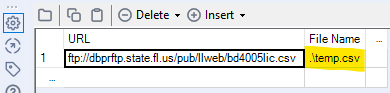
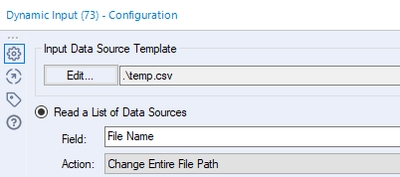
Most seem to work very well. Sometimes if I get an error, I get rid of the File Name column from the Text Input tool, and I change the Download tool section "To a File" and select "Temporary File" and change the Dynamic Input data source template.
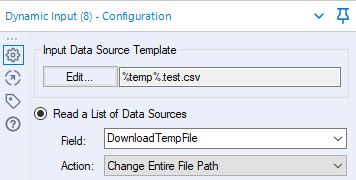
For this method I do not have to create templates in a directory which is nice.
I wanted to include that, so it wasn't repeated, and show you the methodology for how I am trying to import data.
1. The first problem I am having is connecting to this URL xlsx file hosted here.
https://www.commerce.alaska.gov/web/Portals/9/pub/ABC/OtherAlcoholResources/03182020 ABC_CurrentActiveLicenses.xlsx
https://www.commerce.alaska.gov/web/amco/OtherAlcoholResources.aspx
I trouble shot this with Alteryx technical support without success.
2. The second problem I am having is connecting to this URL zip file hosted here.
https://www.abc.ca.gov/wp-content/uploads/WeeklyExport_CSV.zip
https://www.abc.ca.gov/licensing/licensing-reports/licenses-by-statewide/
chris_lovejdunkerley79 to name a few.
https://community.alteryx.com/t5/Alteryx-Designer-Discussions/Can-Alteryx-unzip-a-file-as-part-of-the-workflow/td-p/10604
Can't seem to get it to work and fell like there may be an easier solution.
3. The third problem I am having is connecting to this URL xls file hosted here.
https://www.colorado.gov/pacific/sites/default/files/LiquorLicenses 3.2.2020_0.xls
https://www.colorado.gov/pacific/enforcement/liquor-license-lists
The problem I am having here is the data starts on the third line, and unlike xlsx files that you can specific what line the data starts, xls files don't have that option in the dynamic input data source template. Looking for the easiest work-around.
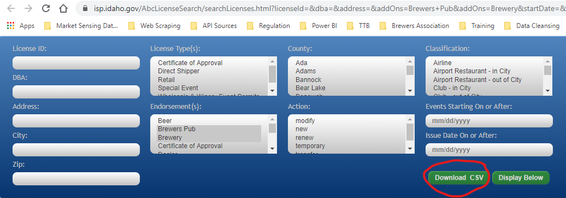
4. The fourth problem I am having is connecting directly a file on the URL hosted here.
https://isp.idaho.gov/AbcLicenseSearch/searchLicenses.html?licenseId=&dba=&address=&addOns=Brewers+Pub&addOns=Brewery&startDate=&city=&issueDate=&zip=#
Is there anyway to get to the file automatically. The URL gets me to the page with all my filters intact, but not to the file.
Thank you.


