In case you missed the announcement: The Alteryx One Fall Release is here! Learn more about the new features and capabilities here
ACT NOW: The Alteryx team will be retiring support for Community account recovery and Community email-change requests after December 31, 2025. Make sure to check your account preferences in my.alteryx.com to make sure you have filled out your security questions. Learn more here
Start Free Trial

Alteryx Designer Desktop Discussions

Find answers, ask questions, and share expertise about Alteryx Designer Desktop and Intelligence Suite.
SOLVED

Trouble Appending Alteryx Output to existing Excel Template

Aviator0807
8 - Asteroid

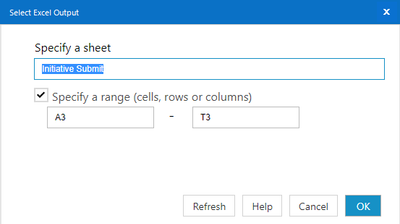
I am trying to append my output to the table below. I manually mapped the fields in the output data tool. So everything  lines up fine. The problem is the data is 5535 rows below, it is doesn't start in row 4 like I want/expect it to. AM I doing something wrong? How can I get my data to append at row 4 and not row 5535?

Aviator0807_0-1625675064020.png

Aviator0807_1-1625675144931.png


5 REPLIES 5
atcodedog05
22 - Nova
22 - Nova

Hi @Aviator0807 


Select output tool output option as overwrite sheet. Since you are writing from range above rows wont be affected.

Aviator0807
8 - Asteroid

@atcodedog05

It gives me the following error

Output Data (105) Error: Encountered existing data beyond the specified range

atcodedog05
22 - Nova
22 - Nova

Hi @Aviator0807 


Give range like A3-Z99999 which is a large range.


A3-T3 is a single line range which wont fit.

Aviator0807
8 - Asteroid


atcodedog05
22 - Nova
22 - Nova

Happy to help 🙂 @Aviator0807 

Labels
Top Solution Authors