In case you missed the announcement: The Alteryx One Fall Release is here! Learn more about the new features and capabilities here
ACT NOW: The Alteryx team will be retiring support for Community account recovery and Community email-change requests after December 31, 2025. Set up your security questions now so you can recover your account anytime, just log out and back in to get started. Learn more here
Start Free Trial

Alteryx Designer Desktop Discussions

Find answers, ask questions, and share expertise about Alteryx Designer Desktop and Intelligence Suite.
SOLVED

The Find Replace function truncated my result on certain date

skong
6 - Meteoroid

Hi All,


I have a simple workflow that retrieve the last quarter-end date and put it in a predefined string.

For example, the predefined string is "//folder_location/YYYY/Month/Quarter_End_Report_MM.DD.YYYY.xlsb" and the input date is 1/30/2020.

Then the output string that I desired is "//folder_location/2019/December/Quarter_End_Report_12.30.2019.xlsb".


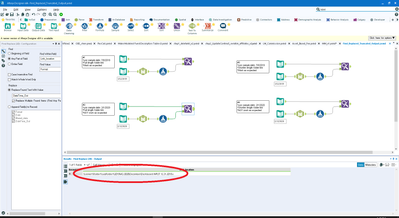
I got the main component works, but somehow the Find Replace function keeps truncate my output for Q3 and Q4.

I thought it is because my string is long, so I tried a shorten string, but the issue still persisted.

If you look into the attachment, sample #1 is working as expected, but sample #2 has my result truncated.  (and the only differences is the date)

The sample #3 and #4 is an experiment to confirm that it is not related to the string length.


May I please ask for help from one of you experts?

Thanks in advance!
skong_0-1613692280449.png


1 REPLY 1
rkapoor
Alteryx
Alteryx

@skong the truncation occurred because you are trying to replace with more characters than what the Link_location has a data type for.


I have increased the size of the Link_location in the attached workflow and it should give you what you expected.

Labels
Top Solution Authors