Hi all,
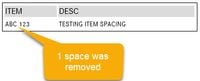
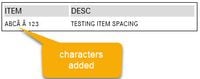
I've seen the community "fix" for this by using the Alt255 instead of a space but that doesn't seem to work. Here's the scenario, I have a table tool that's being fed into an email. There's a column in the table that has 2 spaces but the table tool removes 1 of the spaces in the email. I've tried using the Alt255 in place of the space but see image below for result
Any help would be much appreciated! Am I missing something in the replace formula?
Example: 'ABC 123' (has 2 spaces)
Replace formula: Replace([ITEM]," "," ") -- held Alt and keyed 255 for the replacement section of the formula