ACT NOW: The Alteryx team will be retiring support for Community account recovery and Community email-change requests Early 2026. Make sure to check your account preferences in my.alteryx.com to make sure you have filled out your security questions. Learn more here
Start Free Trial

Alteryx Designer Desktop Discussions

Find answers, ask questions, and share expertise about Alteryx Designer Desktop and Intelligence Suite.

Special characters

Simraneyy
5 - Atom

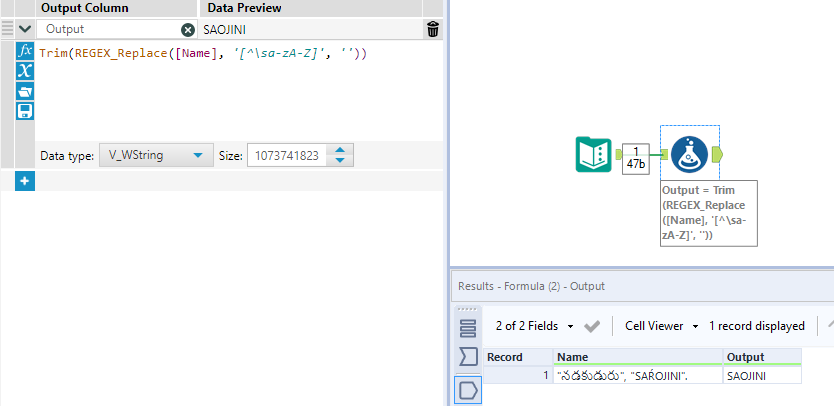
How can one remove special characters in Alteryx- By special characters I mean - "నడకుడురు", "SAŔOJINI".

Like I want them to be only normal alphabets and numbers. It keeps showing the error-  Output Data (17) PATNAME: "Mr. NIRANJAN’S KUMAR S" could not be fully converted from a WString to a String.

4 REPLIES 4
binu_acs
21 - Polaris

@Simraneyy 

Trim(REGEX_Replace([Name], '[^\sa-zA-Z]', ''))

binuacs_1-1646315454509.png


Alteryx_AR
12 - Quasar

Hi @Simraneyy,


Try-


 Regex_Replace ([Field1],"[^a-zA-Z]",'') .


ArtiRajput_0-1646317124587.png

ArtiRajput_1-1646317172332.png


Hope this helps.


Luke_C
17 - Castor
17 - Castor

Hi @Simraneyy 


Leveraging @binu_acs 's reply, if you wanted to keep the 'R' you could do:


UPPERCASE(Trim(REGEX_Replace(DecomposeUnicodeForMatch([Field1]), '[^\sa-zA-Z]', '')))


Luke_C_0-1646317390712.png


MarqueeCrew
20 - Arcturus
20 - Arcturus

@Simraneyy ,


This is one of my favorite RegEx questions.  I once saw a shirt with the following on it:


[^ -~]


I immediately laughed (sick sense of humor).


It is an expression looking for non-printable ascii characters.  Everything in the "normal" character set is between SPACE and TILDE.


REGEX_Replace([Field1], "[^ -~]", '')


This will eliminate all sorts of control or special characters.  You can replace them with nothing (above) or with a space you decide.


Cheers,


Mark

Alteryx ACE & Top Community Contributor

Chaos reigns within. Repent, reflect and restart. Order shall return.
Please Subscribe to my youTube channel.
Labels
Top Solution Authors