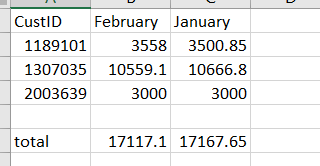
I've connected to a test database that has data associated with deliveries based on customer IDs, delivery date, and charge. I want to automate a way to pull from the database, group by the customer IDs, month of delivery, and sum the total charges for that customer ID by month. Then I want the output to show the total charge per month for each customer ID with the month name being the header of the column (ideally the most recent month at the front of the list of months)
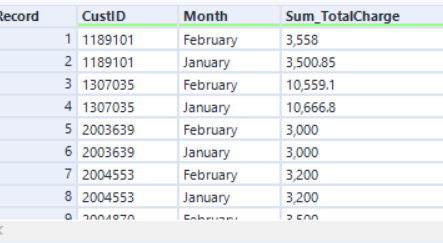
I'm able to get to the second to last step, but can't seem to turn the data shown into the expected output (also shown). After placing the month's charge into their own specific columns, I'd then use the "Add Totals" tool to sum the total charge for each month (shown in the output below). The workflow would be ran once a month to showcase the total charges by each month as the year progresses, which is why the most recent month should be shown first
Input (after utilizing the Summarize tool)
Expected output: