In case you missed the announcement: The Alteryx One Fall Release is here! Learn more about the new features and capabilities here
ACT NOW: The Alteryx team will be retiring support for Community account recovery and Community email-change requests after December 31, 2025. Set up your security questions now so you can recover your account anytime, just log out and back in to get started. Learn more here
Start Free Trial

Alteryx Designer Desktop Discussions

Find answers, ask questions, and share expertise about Alteryx Designer Desktop and Intelligence Suite.
SOLVED

Share folder data files connection on gallery

xiaoyao2tx
5 - Atom

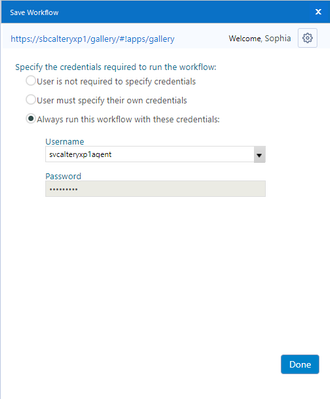
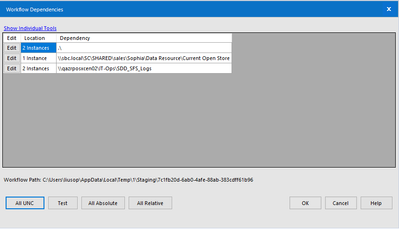
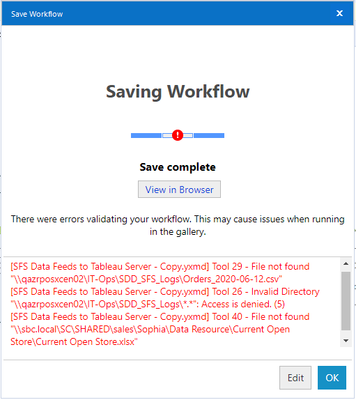
Hi, I want to save my workflow to gallery so that I can schedule it. However, several data files come from 2 different share folders. When I uploaded the workflow, I encountered errors in the picture. In order to give you more information, I also post a picture of how I set credentials. This is an account my IT gave me for uploading workflow to the gallery.


I don't know where the problem is. In my guess, the problems might be:

1. The credentials I set to upload workflow don't have access to the shared folder

2. I specified the path of the shared folder in a wrong way
xiaoyao2tx_0-1592148507515.png

xiaoyao2tx_1-1592148725034.png

xiaoyao2tx_2-1592148961195.png


3 REPLIES 3
danilang
19 - Altair
19 - Altair

Hi @xiaoyao2tx 


You're using the correct UNC format for the paths in your workflow, so the answer is probably #1.  The account that runs the workflow on the gallery, svcalteryxp1agent has to have read(and write for output tools) access to the paths shown in your error message. 


Dan 

xiaoyao2tx
5 - Atom

Thank you for your reply!


How to have svcalteryxp1agent have access to the path? I'm confused because it's a gallery account and I can't see how to grant path access to a gallery account.


Sophia

danilang
19 - Altair
19 - Altair

Hi @xiaoyao2tx 


The standard way to use a service account that needs to have access to shared drives is to have the service account defined in Active Directory in the same way that your network user account is defined.    Then your IT department can grant access to any network paths that are required


Dan


Labels
Top Solution Authors