Start Free Trial

Alteryx Designer Desktop Discussions

Find answers, ask questions, and share expertise about Alteryx Designer Desktop and Intelligence Suite.
SOLVED

Reporting - Letters Missing in Column Headers

JennyRuns24
8 - Asteroid

Hello,


I've created a table in Alteryx, and for some reason, some of the column headers appear to be missing letters, even though they appear when I review the table with the Browse Tool. Image #1 shows the Browse Tool, while Image #2 shows the Excel output. Could someone please explain why this is happening and a way to fix it? Thank you

 

JennyRuns24_0-1679688287500.png

Employee Allocation Reference.PNG


4 REPLIES 4
Hammad_Rashid
11 - Bolide
Hammad_Rashid
11 - Bolide

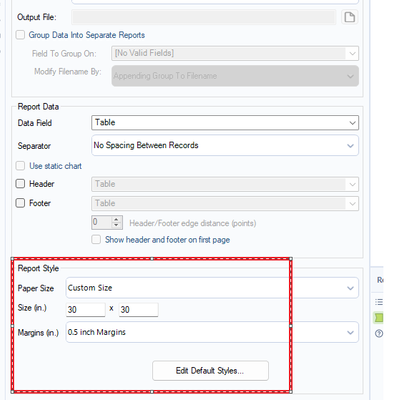
Quick Fix 1 : Change the Paper Size to A3 or B3


Quick Fix 2 : In the Render, under 'Report Style' select 'Custom Size' and then edit the size manually until all of the column headings fit.

binu_acs
21 - Polaris

@JennyRuns24 change the render tool paper size to custom and increase the size

binuacs_0-1679693054296.png


JennyRuns24
8 - Asteroid

That work perfectly, Thank you!

Labels
Top Solution Authors