Hi
I have been working on trying to replace a reasonably complicated process currently done with and Excel Macro. I have been working on this for a few weeks now,but I am really struggling with one part of this and could really do with some help both with the logic and how to approach this with Alteryx.
I have been mainly attempting to do this using the "Multi Row Formula" tool, but I had much success. I am not sure this might need a macro that can loop.
The Problem
In the table below, For each "Area" and "Group" the "Amount" for each "Period" can be netted off with the period next to this IF the Amount is the opposite direction (positive can net against negative, but not against positive) starting at the furthest point and working backwards
For example For Area 1 / Group 1 Combination (starting at the 40Y point)
1. 40Y = 0 so nothing
2. 30Y is positive and so is 20Y so nothing can be netted. +37k goes to "Netting"
3. 20Y is positive and 15Y is negative, so +74k is netted against (48)k so +25 goes to "Netting" and (48)k goes to "Residual"
4. 15Y as all of this was netted against 20Y nothing goes to "Netting" or "Residual"
5. 10Y is positive and so is 7Y so nothing can be netted. +42k goes to "Nettingl"
This is where it gets complicated
6. 7Y is positive and 5Y is negative BUT all +88k is offset against (212)k so nothing goes to "Netting" and (88)k goes to "Residual"
7. 5Y is negative and 3Y is positive so (212)k less +88k = (124)k is netted against +72k and (51)k goes to "Netting" and +72k goes to "Residual"
8. 3Y as all of this was netted against 5Y and 1Y is also positive nothing goes to "Netting" or "Residual"
9. 1Y is positive and 6M is negative, BUT all +17k is offset against (19)k so nothing goes to "Netting" and (17)k goes to "Residual"
10. 6M has $(2)k left after being netted against +17k so $(2)k goes to "Netting"
Then move to Area1 / Group 2 combination
| Area | Group | Period | Amount | Netting | Residual |
| Area1 | Group 1 | 6M | (19,483) | (2,386) | - |
| Area1 | Group 1 | 1Y | 17,098 | - | (17,098) |
| Area1 | Group 1 | 3Y | 72,639 | - | - |
| Area1 | Group 1 | 5Y | (212,544) | (51,156) | 72,639 |
| Area1 | Group 1 | 7Y | 88,749 | - | (88,749) |
| Area1 | Group 1 | 10Y | 42,676 | 42,676 | - |
| Area1 | Group 1 | 15Y | (48,957) | - | - |
| Area1 | Group 1 | 20Y | 74,039 | 25,082 | (48,957) |
| Area1 | Group 1 | 30Y | 37,239 | 37,239 | - |
| Area1 | Group 1 | 40Y | - | - | - |
| Area1 | Group 2 | 6M | 993 | 993 | - |
| Area1 | Group 2 | 1Y | 9,030 | - | - |
| Area1 | Group 2 | 3Y | (40,124) | (31,094) | 9,030 |
| Area1 | Group 2 | 5Y | (21,273) | (21,273) | - |
| Area1 | Group 2 | 7Y | 2,737 | - | - |
| Area1 | Group 2 | 10Y | (11,318) | (8,581) | 2,737 |
| Area1 | Group 2 | 15Y | (5,469) | - | - |
| Area1 | Group 2 | 20Y | 17,990 | 8,984 | (5,469) |
| Area1 | Group 2 | 30Y | (3,537) | - | 3,537 |
| Area1 | Group 2 | 40Y | - | - | - |
| Area2 | Group 1 | 6M | 43,076 | 43,076 | - |
| Area2 | Group 1 | 1Y | 22,365 | - | - |
| Area2 | Group 1 | 3Y | (72,466) | (50,101) | 22,365 |
| Area2 | Group 1 | 5Y | (40,342) | (39,725) | - |
| Area2 | Group 1 | 7Y | 12,117 | - | (617) |
| Area2 | Group 1 | 10Y | (11,500) | - | 11,500 |
| Area2 | Group 1 | 15Y | (47) | (47) | - |
| Area2 | Group 1 | 20Y | - | - | - |
| Area2 | Group 1 | 30Y | - | - | - |
| Area2 | Group 1 | 40Y | - | - | - |
I haven't included a workflow, mainly because I didn't get anywher with this. As mentioned before I was using the mult-row formula tool, but this was of limited use as it can only generate one column. The standard formula tool appeared to be of little use also as its doesn't allow the [Row-1: ] syntax. The more I look at this problem the more I get the impression that it needs a loop, but I am not even sure what tools to use in this loop.
I know this is challenging question, and I have been stuck on it for quite some time. So I really need a genius to be abe to help me.
UPDATE: I have added a demo file with my initial attempt and some test data inluding a couple more columns of data
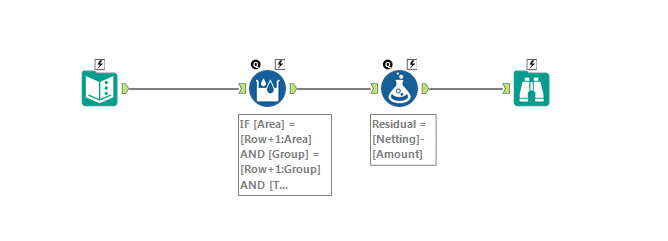
Many thanks
Damien


