In case you missed the announcement: The Alteryx One Fall Release is here! Learn more about the new features and capabilities here
ACT NOW: The Alteryx team will be retiring support for Community account recovery and Community email-change requests after December 31, 2025. Make sure to check your account preferences in my.alteryx.com to make sure you have filled out your security questions. Learn more here
Start Free Trial

Alteryx Designer Desktop Discussions

Find answers, ask questions, and share expertise about Alteryx Designer Desktop and Intelligence Suite.
SOLVED

Replace Column results with another columns

ManuelRodrigues
8 - Asteroid

Hi Team,


I have a column named cost centre and I want to replace the unclassified with the results in the Project cost centre (see image below). I was wondering if a formula tool with if contains function and replace contains function should do the trick but i am struggling to get my head around how this will work? any help will be much appreciated.


Cost Center - Cost center IDProject Cost Centre
Unclassified11100LL
Unclassified11100LL
Unclassified11100LL
Unclassified11100LL
Unclassified1119496
Unclassified1120082
Unclassified1120110
Unclassified1120322
Unclassified1120348
Unclassified1120350
Unclassified1120458
Unclassified1330114
Unclassified1330114
Unclassified1330114
Unclassified1330114
Unclassified1330194
Unclassified1330261


2 REPLIES 2
KarolinaRoza
11 - Bolide

hi @ManuelRodrigues 


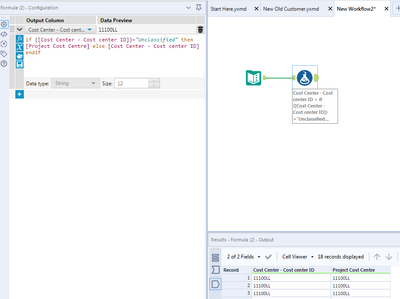
did you try Formula Tool applied on Cost Center column with formula:


if ([Cost Center - Cost center ID])="Unclassified" then [Project Cost Centre] else [Cost Center - Cost center ID] endif

KarolinaRoza_0-1625866388541.png


regards,

Karolina

ManuelRodrigues
8 - Asteroid

@KarolinaRoza thanks for this!

Labels
Top Solution Authors