The Alteryx Community is a finalist in three 2026 CMX Awards! Help us win Customer Support Community, Most Engaged Community, and User Group Program of the Year - vote now! (it only takes about 2 minutes) before January 9.
ACT NOW: The Alteryx team will be retiring support for Community account recovery and Community email-change requests Early 2026. Make sure to check your account preferences in my.alteryx.com to make sure you have filled out your security questions. Learn more here
Start Free Trial

Alteryx Designer Desktop Discussions

Find answers, ask questions, and share expertise about Alteryx Designer Desktop and Intelligence Suite.
解決済み

Reg or if/then?

kiwipops
メテオロイド

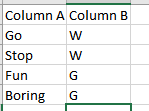
Hi all! I am having issues with my formulas overwriting others. My column A has several different options (5+), and based on those 5 options I need text to output into column B. I can get my first formula working, but when I try to add a formula or tack on to the existing one, it basically overwrites the prior formula. It should work like this:
 

kiwipops_0-1576791123222.png


Where: Go or Stop = W, Fun or Boring = G, etc. So there's multiple values in column A, but less values on the output into column B (grouping fields). My initial Go or stop = W reg formula works, but if I add another formula (any way) next it ignores my prior formula. I hope I'm making sense--thank you in advance!

5件の返信5
fmvizcaino
17 - Castor
17 - Castor

Hi @kiwipops ,


Would you be able to share a sample data and a small example of what is your problem and what you want to achieve?

If you could, please share your formula as well.


Best,

Fernando Vizcaino

ScottE
Alteryx Alumni (Retired)

Hi @kiwipops 


You could try a nested IF:


IF [col_A] IN ('go','stop) THEN 'W'

ELSEIF [col_A] IN ['fun','boring') THEN 'G'

ELSEIF...............

ELSE ''

ENDIF


you can keep going with ELSEIF for each group.


Another option would be to use a Text Input tool and create a lookup table for all your groups and then join it in. 


Hope that helps!  


T_Willins
14 - Magnetar
14 - Magnetar

Hi @kiwipops,


You should be able to do this with a IF/THEN/ELSEIF formula.  With a Formula tool creating Column B use the formula:  IF [Column A] IN ("Go","Stop") THEN "W" ELSEIF [Column A] IN ("Fun","Boring") THEN "G" ELSEIF ... ENDIF with the ... being the other tagging.

fmvizcaino
17 - Castor
17 - Castor

Hi @kiwipops ,


Take a look at the attached example. I'm using one if clause to write everything to the column B.


Let me know if that works for you.

Best,

Fernando Vizcaino

kiwipops
メテオロイド

Thank you, all! Looks like I have a few options. 🙂

ラベル
トップのソリューション投稿者