I have a requirement in which I want to bring in the data from 4-5 different tabs in an excel file before performing any scrubbing. The header names are same in all the tabs. How can I accomplish this instead of bringing in input tool for each tab?
Hello,
The top part of this article should explain how you can import multiple tabs with the same schema at once using the dynamic input tool:
https://community.alteryx.com/t5/Alteryx-Designer-Knowledge-Base/How-To-Import-Multiple-Excel-Sheets-or-a-Specific-Excel-Range/ta-p/398220
Will this work if I need to bring in the selective sheets?
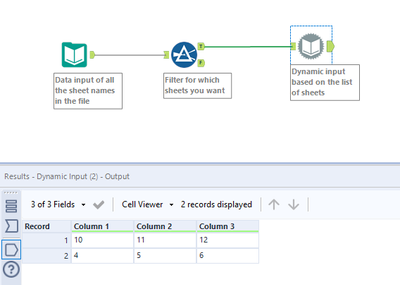
You can add in a filter tool if you want to add a condition on which sheets to bring in. So it would look something like this:
Attached sample excel data source and workflow.
I'm not able to figure out this step in the dynamic input tool. How do I make dynamic input tool read from the input tool?
The input tool is configured to only import the list of sheet names from your Excel workbook:
So the result would look something like this:
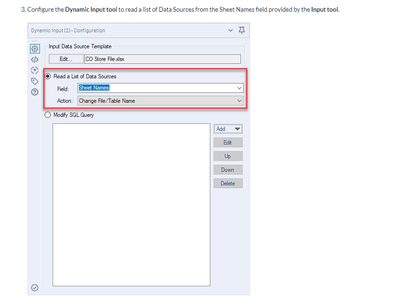
The dynamic input tool would import based on the Field "Sheet Names" which is your list of all the sheets that you got from the first tool. The action to "Change File/Table Name" basically means that the dynamic input does a "batch" processing input of every sheet name in the list and unions the results together to provide a single combined dataset of all the sheets.
Not sure if I fully answered your question but let me know if I can be clearer
Hi @Idyllic_Data_Geek, I'm not sure if there is a simple solution for that (unless I'm missing something!). Is there a reason you can't select same file again? It's more just for the purposes of providing a template of the file rather than taking the data itself, as this would be based off the sheets that are specified.
It does not work. It is giving me an error for dynamic input schema. Even though the schema name is same
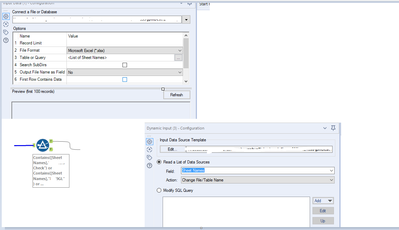
Are you able to show us a screenshot of your Data Input configuration as well as the Dynamic Input configuration?
I agree with @AmalinaH . If it's the same schema then the dynamic input tool should work and you can just filter out the tabs you don't need. You can also try creating a dynamic input macro tool which you can use for both same schema and different schema tabs.
It did not work!
Try changing the action to "Change Entire Path". Also, may I know the error message you're getting.
'Tab I'm interested in' has a different schema than the first file in the set
Alright. Then that means you need a dynamic input tool macro.
can you please help me in setting that up?
Hi @Idyllic_Data_Geek!
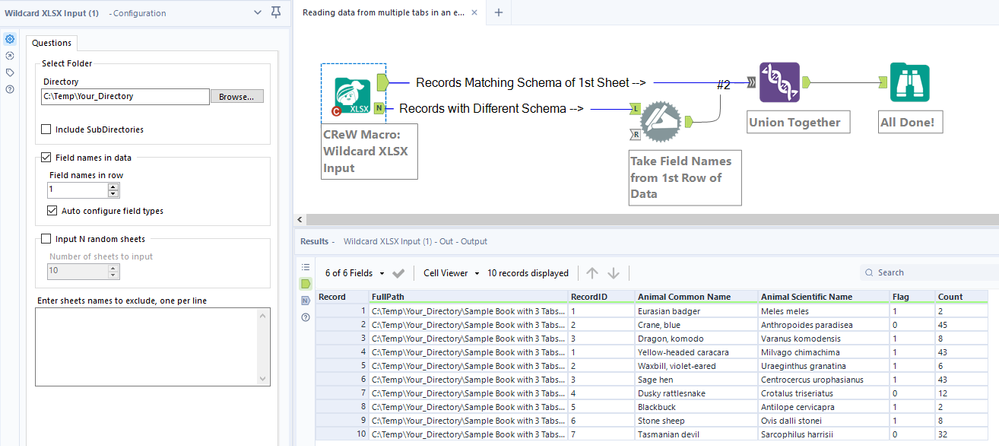
Yes, we can help you get it setup, but have you tried the CReW Macro: Wildcard XLSX Input? I am a big fan of the tool for this purpose.
9 times out of 10 inputting excel sheets works well for me with this tool. If it doesn't work, then it's time to build a custom macro as @Jay-RDC suggests.
Let us know if you try this out!
Thanks,Deb
I don;t have access to this feature in the version of alteryx we have at my employers!
CReW macros are free to install.
Download here:
http://www.chaosreignswithin.com/p/macros.html
If you want to go the macro route, please share your workflow with some anonymized files. We can help you with the configuration of the macro(s).
Thank you. Is there any existing solution that I can look into and configure/create macro accordingly?
You can use batch macro to achieve this
@Idyllic_Data_Geek
You can try the "Directory.yxzp" workflow referenced in this post by @LordNeilLord:
https://community.alteryx.com/t5/Alteryx-Designer-Discussions/Get-worksheet-names-from-excel/td-p/344867
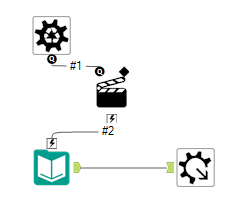
The workflow consists of two batch batch macros. The first macro extracts the sheet names. The second macro inputs the files.
Give it a try and let us know how it goes!