ACT NOW: The Alteryx team will be retiring support for Community account recovery and Community email-change requests Early 2026. Make sure to check your account preferences in my.alteryx.com to make sure you have filled out your security questions. Learn more here
Start Free Trial

Alteryx Designer Desktop Discussions

Find answers, ask questions, and share expertise about Alteryx Designer Desktop and Intelligence Suite.
解決済み

Radio button to select containers and THEN choosing the input files

h12
アステロイド

Hi All


I am trying to create a Analytical app using the radio button options. I have been able to configure the tool containers so that when I click on radio button 1, Radio button 2 closes.


You can see from my screenshot that the input files are on the same page as the radio buttons. I basically wanted it to be like:


Page 1 - Radio Button Options

Page 2 (after clicking next/finsih) - Depending on the Radio Button Option I choose, the different File Browse/input options show up


Currently, the buttons and file browse appear on the same 'page'. Add File 1 & Add File 2 are currently within Radio Button 1 container, and File 3 is within Radio Button 2.


So if I select Radio Button 2, when I go next, I should see only File 3 as an option and not all three..
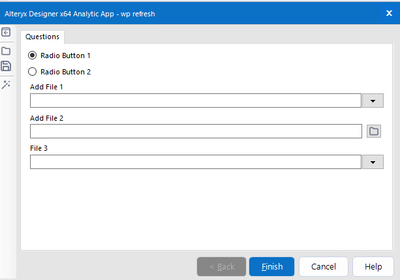
 

h12_0-1643878290936.png


2件の返信2
AngelosPachis
ネビュラ

Hi @h12 ,


For each one of your radio button interface tools, make sure that the option to collapse the group when deselected is ticked


AngelosPachis_0-1643880665345.png


Then open your interface designer (View > Interface Designer) and then move the file input into the respective radio button groups, as shown belowcollapsible_radio.gif

h12
アステロイド

Thank you soo much! I can't believe it was such a straight forward fix!

ラベル
トップのソリューション投稿者