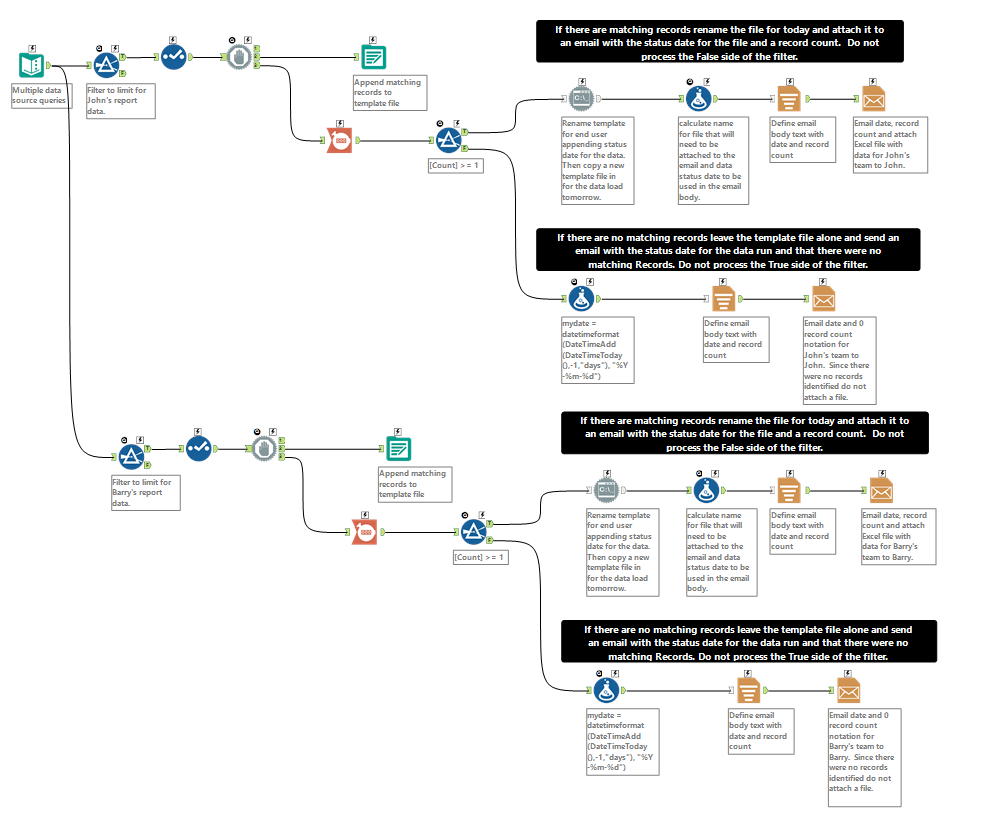
I am having an issue with the Count tool as well as the Filter tool particularly related to instances where the record count value is zero. At the bottom is an image that's a small portion of my workflow (the part I am having trouble with) which I've labeled to show what I am trying to get Alteryx to do.
Goal: The short version is that I have a pull a bunch of data from multiple sources and then split that data out into separate files, one for each team that will correct any issues in the records pulled. Those files are then emailed to each corresponding team lead; the body of the email needs to contain the date for the data involved and a record count.
Issue: The Sumarize tool does not pass 0 record counts, the Count tool does however I must do this multiple times in the workflow so once there are records counted the next time the Count value is zero the tool "chokes" and tries to pass the previous non-zero value too. For example if "John's" file is processed first and has 2 records and "Barry's" file is processed next and has 0 then one email goes out for John but two go out for Barry, one as if there were 0 records for Barry and one as if there were two, except the attachment file (which should only be included if there are records) has no records; because there were none. If the [count] of records for Barry is at least one then only one email is sent to Barry. If I reorder so Barry's file is processed first everything works fine. Reordering is not possible because the data is broken out into 6 teams and any of them could have zero records on any given day.
Already tried: I have already tried giving each Count tool a unique name, using the formula tool to create a new value for each Count tool and then using that new value name in the Filter tool. I have tried the same using the Sumarize tool as well as the Running total tool (after adding a column to the data to be counted). I have also experienced issues when using the formula tool to identify if records were identified for the corresponding team I have tried using Null, Not Null, IsNumber and other functions as well as adding 1 to the Count value in order to achieve a non-null/non-zero/numeric value I can match on. I have also tried using the RecordID tool.
I have also observed this behavior in consecutive runs of a test workflow with only one branch (team filter) using the following dummy data:
| data | John_File | Jane_File | Barry_File |
| dataset1 | Y | | |
| dataset2 | Y | | |
| dataset3 | | Y | |
- I open the workflow and run for Barry, I receive one email, no attachment and the email indicates there were 0 records, however the template file renaming process (Run Command Tool) is triggered even though no records were loaded into the file and it should only run if there were records.
- I then delete the renamed file and change the filter in the workflow to be for John, I receive a single email indicating there were two records with the newly renamed template file attached containing the two records.
- I then delete the file with John's data, change the filter back to be for Barry and run the workflow a third time I now receive two emails for Barry one with no attachment indicating there were 0 records and a second email with a blank attachment yet the email indicates there were two records.
- I again delete the renamed file and change the filter in the workflow to be for Jane, I receive a single email indicating there was one record with the newly renamed template file attached containing the one record.
- I once more delete the file previously created (Jane's data), change the filter back to be for Barry and run the workflow a fifth time. I again receive two emails for Barry; one with no attachment indicating there were 0 records and a second email with a blank attachment yet the email indicates there was one record.
Alteryx is pretty amazing so I'm kind of surprised this seems to be so difficult and that I could find no similar or related posts in these forums, or through Google searches. About the only two solutions I've thought of so far would be to create a dummy row of data and merge it with the real data to always get a count value of at least 1, then filter it out when I output the dataset into a file. It just seems this should be easier than doing all that for each report. It just overly complicates the workflow. I also thought about just attaching the blank file and have one path regardless of record count however that also seems overly complicated and silly to attach a file with no data just so only one email is generated for each team.
So how do I get Alteryx to run the workflow as labeled below?
Thanks.


