I'm encountering an issue with preserving Excel formatting when publishing a workflow to the Gallery.
Locally, everything works as expected — the output Excel file retains formatting such as:
- Bold first row
- Conditional formatting that highlights specific rows
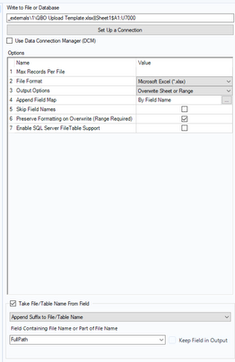
This works when I have “Preserve Formatting” selected in the output settings.
However, when I publish the workflow to the Gallery:
- The output file does not retain the formatting.
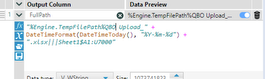
- The file is written to EngineTempPath.
- I'm dynamically updating the file name using a field that appends the date.
- I'm using a template Excel file that already contains the desired formatting.
Is there a way to ensure that the formatting is preserved in the published version as well? Any guidance or workaround would be appreciated.


