How do I parse multiple field at once?
I have 2 datasets, and each one was updated randomly by previous users. I need to combine both of them together. It was about 74 columns long and I have merged 2 datasets together. All I need now is to parse the merged datasets to check if there is any same/different information in the dataset and update it accordingly.
I tried regex, but it only can parse once at a time. My parse delimiter is "/". and it is alphanumeric.
My plan is to parse the remaining and use multifield to check if the data is the same in both table, and keep only one to remove duplicates.
I am using excel vlookup at the moment in case I cannot finish this project on time.
Data as below (input)
| Sector | Code | City |
| Other/Other | 1586-U/1587-T | Tasmania/Tasmania |
Output
| Sector | Code | City |
| Other | 1586-U | Tasmania |
| Other | 1587-T | Tasmania |
I am doing it in this way at the moment which is a really dumb way, as i will have to manually gone thru 74 settings, but its better than vlookup, vlookup crashes my file
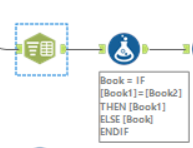
I am using text to column to parse my field/column, then using formula to see if the text to column part is the same or not, if its the same then ill just take the 1st one, if not ill take the one with delimiters for outlier checking


