ACT NOW: The Alteryx team will be retiring support for Community account recovery and Community email-change requests Early 2026. Make sure to check your account preferences in my.alteryx.com to make sure you have filled out your security questions. Learn more here
Start Free Trial

Alteryx Designer Desktop Discussions

Find answers, ask questions, and share expertise about Alteryx Designer Desktop and Intelligence Suite.
RÉSOLU

Parse Error at char(1): Unknown variable "My variable".... but variable exists?

KikiMartin
Météoroïde

Hello,


I'm trying to create a formula with a previously calculated variable.  (PeakAccel & AveAccel)

Capture 1.PNG


But, when I try to use these variables in a formula downstream....
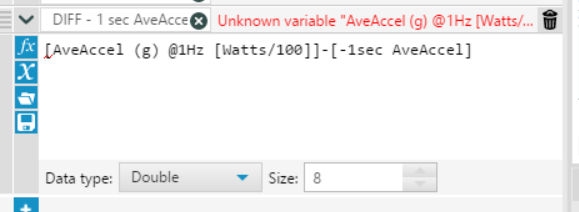
Capture 2.PNG


...though it appears in variable list:
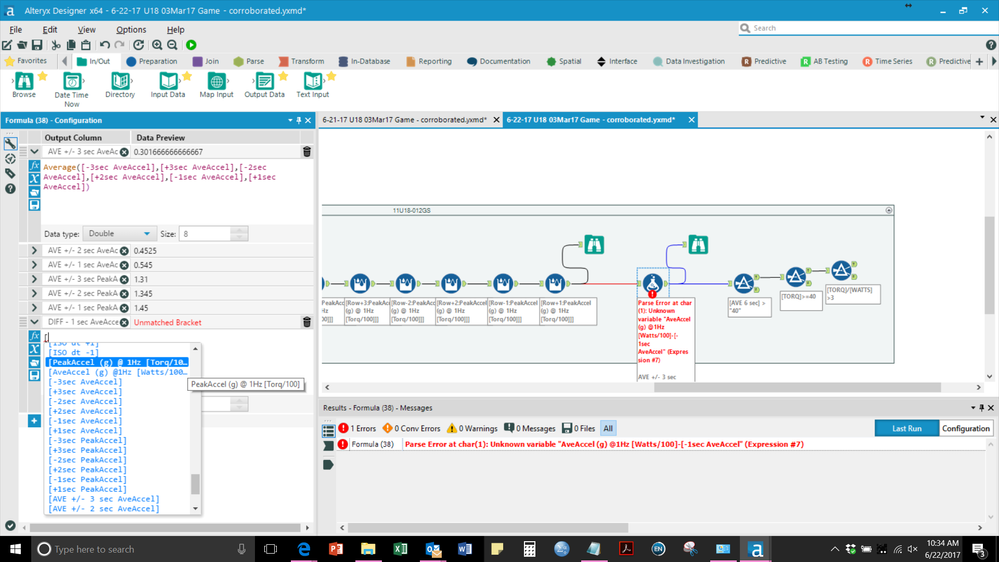
Capture 3.png


I am perplexed.  Why isn't the variable recognized in the formula tool?


Thank you for the help,

(I'm a novice user, eager to improve).


Kiki

4 RÉPONSES 4
NicoleJohnson
ACE Emeritus
ACE Emeritus

I believe it's an issue with the square brackets you have contained in your field name. If you change the field name to AveAccel (g) @1Hz (Watts/10) instead, with parentheses instead of square brackets, it should work.


NJ

DanS
Comète

Looks like the brackets might be causing a problem in your headers. Try adding another one in the formula. 

Ex.

"...[Watts/100]]]..."


That should work.

KikiMartin
Météoroïde

THANK YOU! 


The additional square bracket worked!


(But for my understanding, why?  It seems like it would be an unmatched bracket).

DanS
Comète

Not 100% without seeing your whole workflow, but it could be that it hadn't picked up the new column at that point in the workflow yet. 


F5'ing your workflow should update the downstream newly created columns. 


Thanks,

Dan

Étiquettes
Auteurs des meilleures solutions