ACT NOW: The Alteryx team will be retiring support for Community account recovery and Community email-change requests Early 2026. Make sure to check your account preferences in my.alteryx.com to make sure you have filled out your security questions. Learn more here
Start Free Trial

Alteryx Designer Desktop Discussions

Find answers, ask questions, and share expertise about Alteryx Designer Desktop and Intelligence Suite.

Only perform calculation if the value in a different column is unique

hyost
6 - Meteoroid

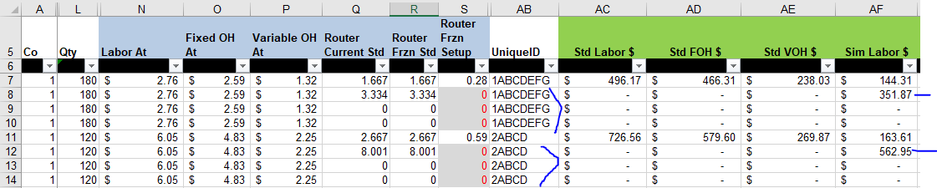
My goal is to only apply the formula for Std Labor $ (N * L) to the cell in column AC if the value in AB is unique. I do not want to see $496.17 but once for each UniqueID. However, I do want to show $0 in the other cells with the same UniqueID. I cannot simply remove records in the UniqueID column with the Unique tool because I have other formulas that need to calculate. There could be something in column AF where a duplicate is in AC (see image below).


The formula that I am using in excel to perform what I am looking for in AC is: =IF(COUNTIF(AB$7:AB8,AB8)=1,N8*L8)


How can I do this in Alteryx? Is there any additional data that I might need to provide to be helpful in answering my question? Thank you so much in advance!!
 

hyost_3-1685481916205.png


2 REPLIES 2
binu_acs
21 - Polaris

@hyost One way of doing this with the Multi-Row tool

binuacs_0-1685482498236.png


hyost
6 - Meteoroid

Thank you so very much for such a quick response. It worked beautifully!

Labels
Top Solution Authors