ACT NOW: The Alteryx team will be retiring support for Community account recovery and Community email-change requests Early 2026. Make sure to check your account preferences in my.alteryx.com to make sure you have filled out your security questions. Learn more here
Start Free Trial

Alteryx Designer Desktop Discussions

Find answers, ask questions, and share expertise about Alteryx Designer Desktop and Intelligence Suite.

New Fields no longer appearing inside macro

CNichols84
7 - Meteor

Let me start by saying that I'm new to Alteryx so this could be a very simple fix.

I created a macro that I have been using for a long time, occasionally I will add new fields to the workflow, then go into the macro and add a new summarize pulling in that new field. For some reason it no longer updates for new fields. I have tried everything I can think of and the new fields don't show inside the macro to then utilize. 


On the macro input I normally have "Show Field Map" unchecked, in my process of trying everything to fix this, I clicked it on and I noticed that the new fields don't show up there (which makes sense) but the new fields do show as available options in the drop down.


I created a "test" formula, it shows in the select, it will show in the Macro "Show Field Map" dropdown options, but no matter what i can't get it to appear inside the macro.
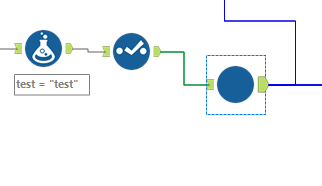
 

alteryx.png

I feel like there is a simple solution that I am not aware of as a newbie. 


Thanks!

4 REPLIES 4
DataNath
17 - Castor
17 - Castor

Hey @CNichols84, when you initially set up your macro, in your Macro Input tool you'll have a dataset that you used to create and configure it. You can hit 'Edit Data' and amend that to add the new field.


On the mapping, this just allows you to replace fields that you've used for various purposes inside the macro, with fields in your main workflow i.e. outside the macro. For example, if I set up a very simple macro that groups by a field called [Company] and does a sum of [Revenue], without field mapping, if I then plug a dataset into it which has fields called [Corporation] and [RevenueMade], the macro will error as it is expecting the exact same names i.e. Company/Revenue. However, if I turn on field mapping, I can use the dropdowns to match [Company]=[Corporation] and [Revenue]=[RevenueMade] and Alteryx will replace these references where relevant in the macro, allowing it to run smoothly.


Hope this helps!

CNichols84
7 - Meteor

Hi and thanks for the response! When I go to the Macro Input, it is selected on "File Input" and I think the "Edit Data" you were referring to is for the "Text Input" option?


What confuses me, is that for months if I needed to add a new field I would just go into the macro, run it, the new field would show up in the Select, and then I could do whatever I wanted with it, save the macro and everything was great. I literally just added 2 new fields two days ago with no issue, then yesterday I went to add another new field, doing it the same way I have done it for months, and for some reason now no new fields show up.


alteryx1.png

DataNath
17 - Castor
17 - Castor

Hmm yep that is the same behaviour I'd expect - running the macro workflow itself ought to show up the latest version of that file @CNichols84. Is there any way the file has been saved as another name/version and you're pointing towards the old one or something?

CNichols84
7 - Meteor

"running the macro workflow itself ought to show up the latest version of that file" - well at least that is good for me to know, I wasn't sure if I accidentally changed some setting. I just tried turning my computer on and off again and now i'm going to re-run my workflow and see if that helps lol I have exhausted all my other options.


This is actually the one and only macro I have ever made, so there isn't any issue with it crossing streams. 

Thanks for your help, I can't keep wasting time on this stupid issue, so it looks like I will just do it outside the macro and then join back in after the macro lol

Labels
Top Solution Authors