Dear Experts,
I need your help in building a reconciliation between two data sets. I am attaching an excel example here but needless to say that actual data set is very large.
Thanks in advance.
Mohit
Hi @mohit9garg,
I am sorry for the late reply, I did not receive a notification for your tag 😞
I wanted to give this a clean attempt and did not look what the other already made - so maybe it's already solved, but here is my approach:
Let me try to explain what I do:
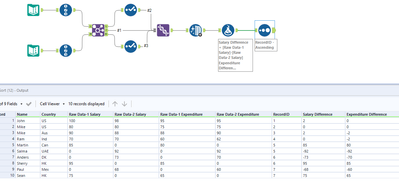
- First I transpose all the data column into rows to make it possible to dynamically calculate the difference
- I add a new column with + 1 / 2 to separate them later on (Formula)
- I Join everything together and Union it afterwards to get all data combined
- The Select tool changes the type of the value columns to double
- Data Cleansing to convert nulls to zero
- Formula to calculate the difference
- Next I separate the data with 3 Select tools into Name Value pairs. Name Value from Left Dataset, Name Value from Right Dataset and Name Value "Difference" form both. I rename all to just "Name Value" here
- Union everything together
- Filter Nulls again
- I decided I want to keep the column order. The first input has a wireless connection to the select tool in the second path. I remove all key column and use the Field Info tool to get the column names in rows. The Multi-Row-Formula adds a counter column and the Formula Tool combines both into a "1 Column name" format to preserve the order.
- Find and Replace to bring everything together
- Now I am finally able to Cross-Tab everything based on the ordered names
- Multi-Field-Formula to convert nulls to zero
- Dynamic Rename to remove the "order numbers" in front of the columns and also to change the underlines to normal whitespaces.
I'd guess that some of the other solutions are probably more easy. I am usually overcomplicating stuff because I try to dynamic and flexible as possible. This solution should also be able to handle future extra columns in the Input Data and applying the Difference Formula to them and bringing all into shape.
Workflow is attached. Let me know what you think and sorry again for the late response 😞
Best
Alex
I made the changes in the attached file. I also fixed a bug that occurred when only values in the 2nd input are available.
Let me know what you think.
this looks like a minor bug: You need to use a Render-Tool behind the Table tool and not a normal Output tool.
If you have further struggle with it, we could do a skype / teams / screensharing session to fix it together 😃
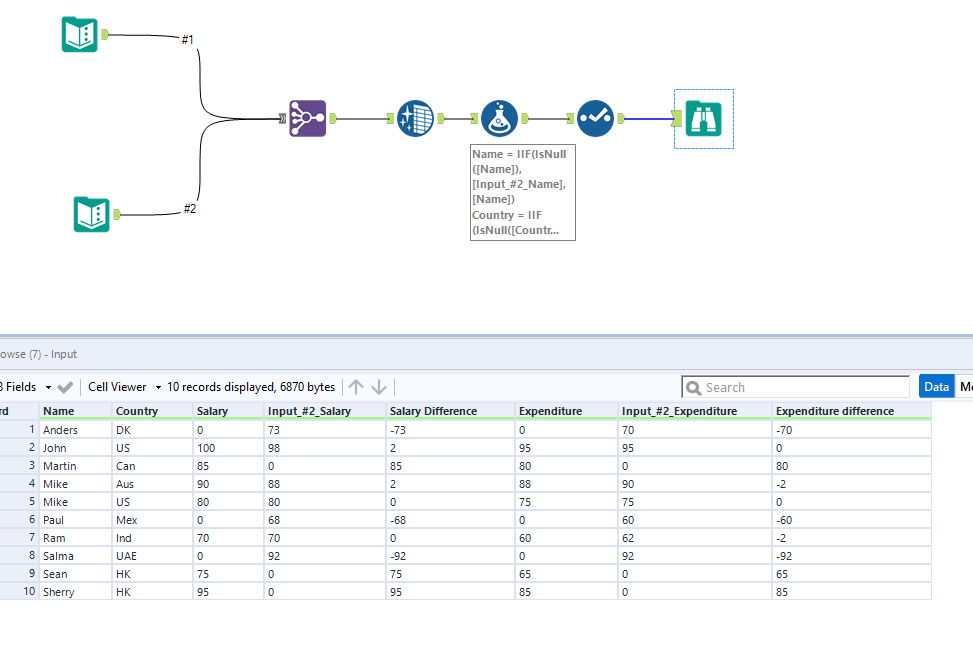
Would it be something like this that you're looking for?
Here is the sample workflow. Hope this is helpful. .
Apologies, this solution didn't work as my actual data is in V_String & Double so Join Multiple is not working.
Apologies, I should have mentioned this earlier.
@ponraj @DavidP @grossal ...I am attaching another example of rec. Actual data is similar to this one. Please help.
Hi @mohit9garg, does the attached solution get you the output you are looking for?
Let us know.