Hi Alteryx Community,
I hope you can help me with a workflow I’m trying to build in Alteryx Designer (version 2024.2).
I have two input datasets:
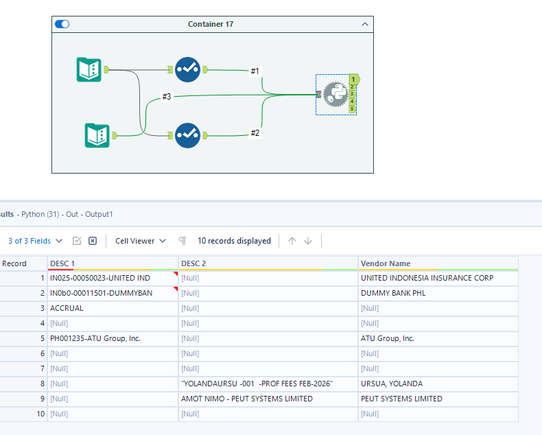
Contains a free‑text field (DESC1 OR DESC2) with embedded vendor names. Example (see attached dummy file - input 1 tab)
Contains clean vendor names (see Input 2 sheet)
I need to match the vendor name embedded inside Input 1 with the clean vendor name in Input 2 using Fuzzy Match, then produce an output like in the Output tab.
Can you provide a list of those names with “Corp.”, “Inc.”, “LTD”, “Limited”, etc.
@PassION_es Try now
I would look at this article - it has a workflow to help you get started! https://community.alteryx.com/t5/Tool-Mastery/Tool-Mastery-Fuzzy-Match/ta-p/45485
@PassION_es Attaching both python and Fuzzy match version, python is more accurate compared to fuzzy match tool
Hi, @PassION_es
Another way for you: (don't need python or fuzzy match tool.)
Hi @flying008 , thanks for this. However, it did not match the correct output. we have a lot of vendors with some of these have almost similar names such as "United" (United Emirates, United Lab) and such as a vendor name with "Corporation/Corp" on it. It did not match the correct vendor if you will only get one single word from the description or vendor masterlist.
Unless you can provide more sample data or precise matching thresholds, we cannot offer further help.
Hi @flying008
I have added 4 vendor names having the same single word at the end (but some similar names are not always located at the end).
Hi @binu_acs ,
The output produced should be the same in the dummy file:
@PassION_es The python script works for me
You don't even need to modify any part of above workflow, and the output will still be exactly what you want.
@flying008 can you share your yxmd or yxzp file? Because the workflow i created based on your video resulted to incorrect outputs. Thanks.
Hi binu_acs,
I have tried the recent workflow you posted and there was an error I encountered during running. It came from the Python tool. Please see attached notepad for the error posted from the results window of alteryx.
Do I need to install a python environment and others in my local drive before running the python? Thanks.
Due to security policy restrictions, I am unable to upload any workflow files. Please upload the files as you created based on the animation, and I will review the options to confirm the differences later(assuming you have disabled AMP mode).
Great discussion on building a fuzzy match workflow for vendor names 👍 Handling variations like abbreviations, spelling differences, and extra words is always tricky. Pre-cleaning data (removing terms like “Ltd”, “Co”, etc.) before applying the Fuzzy Match tool really improves accuracy.Also, adjusting match thresholds and using grouping helps refine results further.For exploring more data and real estate insights, Addressbox is also a useful platform.
Hello @flying008 ,
Here's the dummy yxmd file. Please note that this workflow now works on my dummy file and it produced the desired results. However, upon using this in an actual inputs with larger datasets, it did not produce the correct vendor name. Could you pls check my workflow? Thanks
1. Please upload the template data for your error. Your workflow file itself depends on the imported xlsx file, but you did not upload it, so I cannot reproduce the scene of the error. (Your workflow tool settings are fine.)2- Please disable AMP mode.
Hi @flying008 ,
See attched dummy file and workflow. I disabled also the AMP.
@PassION_es rapidfuzz is the best option, i updated the code to install this module, can you try now
Hi Binu_acs,
I think I am having issues with the version for embedding python. I am currently using alteryx 2024.2 version.
Please see attached screenshots:
@binu_acsThis is what I got from Co-pilot regarding the issue of rapidfuzz
@PassION_es try the attached workflow, i m using different module here
@PassION_es the module rapidfuzz is the best option for your use-case, !pip install rapidfuzz works for me in alteryx designer, in your case if possible ask your admin team to install the module rapidfuzz then re-use it,
Hello @binu_acs
The new module runs successfully without errors, and most of the outputs are correct. However, there is still an issue with the vendor names that contain the word “Limited.” As shown in the Vendor Name Input File 2, there are two vendors with “Limited” in their names.
In the actual datasets, there are many similar cases where vendor names include terms like “Corp.”, “Inc.”, “LTD”, “Limited”, etc.
To ensure the script produces unique and accurate matches, can you include an additional preprocessing step before the Python module runs? Specifically:
👉 Remove these common legal suffixes from Input 1 (Desc 1–Desc 2 columns) so that the remaining text becomes unique.
If these suffixes are removed prior to processing the python script, the remaining characters in Desc 1–Desc 2 should be distinct enough for the logic to return the full and correct results. Thanks
hi @binu_acs
No need — I was able to handle it by using a multi‑field formula to remove those common suffixes. 😊
Thanks so much for your help! I think it’s finally time for me to start learning Python when I’m back from my leave.
After testing, your workflow produces correct results here, whether AMP mode is enabled or disabled.
Hello @binu_acs ,
I tried to embed the python in the actual workflow. It never stops running, was it because of the change in input files used? Attached is the complete yxmd file for your reference, without the input files so you can see the whole picture of my workflow. I won't be able to share with you the package as it is prohibited by our company due to some restrictions. Python tool is located at the bottom right corner of the processing tool.
Thanks for accomodating. Upon checking, still it produced incorrect outputs (vendor names)when using larger datasets with thoursands of lines, some lines (desc 1-2) are similar to each other. See sample screenshots attached.
The last two vendor names are correct, but others are not their vendor names.
Please upload the real source data of your incorrect result. If you did not upload it, I cannot reproduce the scene of the error for figure out the point.
Fuzzy Match alone might struggle if the vendor name is buried inside longer text. I’d suggest first using a Regex tool to extract likely vendor patterns, then run Fuzzy Match against your clean list.
You can also experiment with different match styles (e.g. Name vs Address) and adjust match thresholds — that can make a big difference depending on how noisy your data is.
Please see attached INPUT FILE 1 Fields with two dummy rows for your reference. The INPUT Files 2 remains the same but with around 600 vendor names only. Thanks in advance.
@PassION_es try the updated workflow