Hello community,
I have a dataset from which I am creating a series of summaries - total transactions and investment per quarter, grouped in one output by seller location, and in another by buyer location.
In my incoming data, these are sometimes blank.
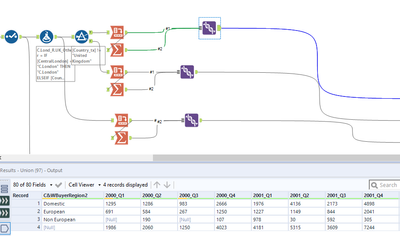
I have processed the data, and am using a CROSSTAB tool to pivot the data, with "country" in rows and quarter (2018.3, 2018.4 etc) as the column headers. NULL appears as one of the countries.
I have used a SUMMARIZE tool to create a grand total for each column, and I have added this (using UNION) to add the grand total to the bottom of the CROSSTAB output.
However, (1) as the SUMMARIZE output does not have a column header, it does not have a row name when I join the two sets of data, and (2) the NULL country rows are listed as "NULL".
Is there a way I can label a row? I realize in writing this that there was (very probably) a less clunky way of adding a grand total.
An example of the output is below:
Thanks
DoC