ACT NOW: The Alteryx team will be retiring support for Community account recovery and Community email-change requests Early 2026. Make sure to check your account preferences in my.alteryx.com to make sure you have filled out your security questions. Learn more here
Start Free Trial

Alteryx Designer Desktop Discussions

Find answers, ask questions, and share expertise about Alteryx Designer Desktop and Intelligence Suite.

NULL CELL NOT SUPPLYING THE VALUE

KamenRider
Bolide

Hi guys,


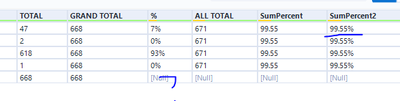
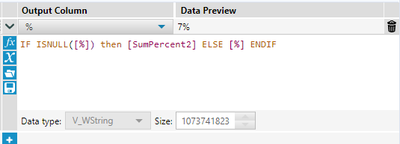
I am a kind of confuse because I have created a formula but the formula is not working. I am trying to supply the NULL value at column % but nothing is working.


Can you please help for the correct formula? See below snapshots for your reference.
 

Capture.PNG


Capture2.PNG

 Hope to hear from anyone.

Kamen

14 RÉPONSES 14
CoG
Magnétar

Are you trying to refer to other rows/records? The scope of the formula tool is a single row. So based on your formula, that last row IsNull([%]) is true and so the value is updated with [SumPercent2], which is also null. Therefore nothing is going to change. Please include what your desired output is, so that more specific help can be provided.

KamenRider
Bolide

Hi @CoG 


I like the 99.55% (sumpercent2) be on the last column of field % which looks like this:


OUTPUT.PNG

Please let me know if you still have questions. Thanks and hope to hear from you.

Kamen

apathetichell
Arcturus

I think your formula needs to be if [SumPercent2]=null() then null() elseif [%] =null() then [SumPercent2] else [%] endif


basically your formula is saying is % isn't null - keep it as % - but perhaps you are looking to replace that value as null() if sumpercent2 is null?

KamenRider
Bolide

HI @apathetichell 


Actually you are right, if the % is not NULL, it will give whatever value it have and if null it will get the value from the SumPercent2. The reason because I am getting some sort of Total at the end of the row. I use the summarize tool to get the total. Below is the raw data from the workflow:


Capture3.PNG


I need to put the SumPercent2 on the last row under % since it will represent its total.


Please help me on this.

Kamen

apathetichell
Arcturus

multi-row formula - modify the field %

if [row+1:%]=null() then [row-1:SumPercent2] else [%] endif


or something like that. you'll also want to set values that don't exist as equal to null

KamenRider
Bolide

Hi @apathetichell 


Thanks for the response. I use the formula you gave but it replace my zero% instead it should go or falls to the 5th rows which for the totals. Can you please update the formula you gave?


Replace.PNG

Replace1.PNG

Replace2.PNG

Hoping for your response. thanks.

Kamen

apathetichell
Arcturus

or something like that. you'll also want to set values that don't exist as equal to null - right now you have it at 0.

KamenRider
Bolide

Sorry @apathetichell , what do u mean.. can you please elaborate? What will be the correct formula?


Hope to hear from you.

Thanks,

Kamen

KamenRider
Bolide

hI @apathetichell 


I think a get what you mean. however result still show that the zero has been still replaced by the total percentage 99.55%. Can you help me how to retain the zero?


RESULT01.PNG

RESULT02.PNG

 Please advise.


Kamen

Étiquettes
Auteurs des meilleures solutions