Hello
I am new to Alteryx and I have to design a workflow, which involves many different steps in it. I am looking for some assistance in how these multiple steps can be done.
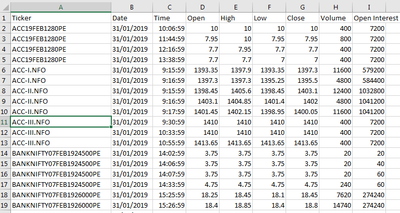
The csv data file that I am working with has Stock Market Data in the form of 1-minute time intervals in it. Although the actual data file is quite big, having millions of rows in it, but I have made a very small sample out of it for sharing on the forum. All this data has a constant schema and have the following 9 Fields inside it -
Ticker
Date
Time
Open
High
Low
Close
Volume
Open Interest
I have also uploaded the sample CSV File used in this work, as well as the Alteryx Worflow Package .yxzp, so that you can easily open it up on your machine. I have used the latest version of Alteryx for creating these workflows. You may please have a look.
After importing the csv file into the Alteryx, I apply the “AUTO FIELD” tool so that all fields are identified correctly according to the data inside them. Now I have to perform these additional steps on this data.
1. Remove Spaces “Leading and Trailing White Spaces both” from all the names given in the "TICKER" FIELD
2. Remove the “.NFO Suffix” from all the names given in the "TICKER" FIELD
3. Apply the Multi Step SORTING according to these 3 Fields, one by one, so that all the data is arranged in Proper Order –
Date - Ascending Order – “Oldest Date at the top and newest date at the bottom”
Ticker – Alphabetic Ascending Order
Time - Ascending Order
4. After doing the above steps, I need to filter the data into different categories based on the following conditions –
If either of these 3 suffix "-I, -II, or -III" are present at the very end in the names given inside the "TICKER" FIELD then separate that data as csv file and name it by adding a suffix of “_Futures” to whatever the name was of the original data input file. In this case, the name would become “20190131_Futures.csv” file.
And all the remaining data, which does not have those 3 suffix, should be separated as csv file and name it by adding a suffix of “_Options” to whatever the name was of the original data input file. In this case, the name would become “20190131_Options.csv” file.
5. Actually before creating the above-mentioned two output csv files, I want to perform a few additional steps as well, but I am not sure if that could be done inside the same data flow or do I need to create a separate flow for them, once the csv files are generated!
For the Output of the _Futures.csv data, I need to add a New Field by the name of “Month Number” and I need to put in the values inside them based on this logic – If the "TICKER" FIELD has the suffix of “-I” then put 1 inside Month Number Field, if it is “-II” then put 2 and if it is “-III” then put 3 and if it is none of the above then put 0 into Month Number Field.
Same way, I need to add a New Filed by the name of “Month Number” to the _Options.csv data and I need to put in the values inside them based on this logic – If the "TICKER" FIELD contains the value of “19JAN” then put 1 inside Month Number Field, if it contains “19FEB” then put 2 and if it contains “19MAR” then put 3 and if it is none of the above then put 0 into Month Number Field.
When you open up the attached Alteryx Worflow Package .yxzp file, you will notice that I have been abl
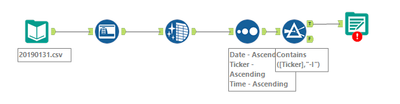
e to do most of the above tasks to some extent, but I am not able to define the Filter Condition as explained in point 4 above. I can write the filter condition for “-I” but how to include all three into the filter, like "-I, -II, or -III" ? And I have not been able to define the method of saving the output files according to the input file names. A few other steps could not be done yet, as I am not being able to figure out the ways to do them.
Any help that you can provide in this, will be greatly appreciated.
Thanks a lot