tl;dr When I use the Group BY option in the Multi-Row Formula tool it works when I check to see of this row value is equal to that row value. But it fails when my condition is checking to see if this row value is not equal to that row value. I fixed it by adding in an equivalency check on the column I am grouping by.
I'm working with utilities data where I have service points that provide water, natural gas, or electricity. I then have meters attached to service points. The service points are fairly immutable but the meters can and do change.
I have three scenarios, the second of which is (was) giving me conniption fits.
BADGE_NBR = the meters
SP_ID = the service points
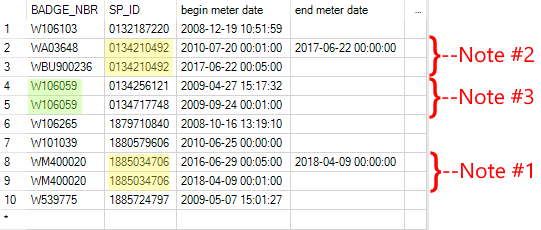
Scenario #1 - Some automatic meter readers were going into an infinite loop and needed a firmware update. So the meter badge number didn't change but a removal and installation had to be recorded to reset the beginning meter read value back to 0. This works as I would expect. Formula is thus:
iif([BADGE_NBR] = [Row+1:BADGE_NBR], 1, 0)
Scenario #2 - For whatever reason, a meter has been replaced with a different one. Here, the Multi-Row Formula tools seems to care about the Group By. I've used these formulas:
iif([BADGE_NBR] != [Row-1:BADGE_NBR], 1, 0)
iif([BADGE_NBR] != [Row+1:BADGE_NBR], 1, 0)
Scenario #3 - Meters can be and are used at different service points. Unlikely to appear sequentially in my data but I faked it here to test for it, just in case.
I can fix it by adding in the field I'm grouping by:
iif([SP_ID] = [Row-1:SP_ID] and [BADGE_NBR] != [Row-1:BADGE_NBR], 1, 0)
This then works whether I have the Group By checked or not.
I'm using 2018.1 but have duplicated this in 11.7. Is this a bug or am I only as smart as a box of sidewalk chalk? (I am quite open to the latter being the case.)
Thank y'all,
David


