ACT NOW: The Alteryx team will be retiring support for Community account recovery and Community email-change requests Early 2026. Make sure to check your account preferences in my.alteryx.com to make sure you have filled out your security questions. Learn more here
Start Free Trial

Alteryx Designer Desktop Discussions

Find answers, ask questions, and share expertise about Alteryx Designer Desktop and Intelligence Suite.
解決済み

Macro wont open. "Question tool load error, tool id missing associated question data"

warrencowan
コメット

Had a spot of bother.... tried to run a workflow with a macro in it but got the above error.
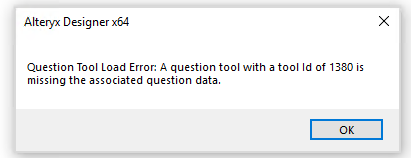
 

alteryx errors message.PNG

I have tried to open macro directly through file explorer and alteryx open dialogue to no avail. Just flashes error dialogue and then fails to open on clear.


Have tried dragging it on to a an empty new workflow tab, and it seems to open a tab, but wont display any of the tools or settings. Worse still as i try to close the other blank new workflow tab, it just iterates up a number with each close.eg new workflow2, new workflow 3 etc etc


Seems very wrong to me.


There have been no changes since last successful run, but it seems corrupted somehow. I have upgraded the version since. Coudl that be the issue.


Any help much appreciated.


many thanks


Dubya


6件の返信6
mmenth
ボリード

Hey @warrencowan,


Can you open the macro by right-clicking on it in your workflow and going to 'Open Macro...' rather than through file explorer? 


Capture.PNG

warrencowan
コメット

sorry @mmenth shouldve said, that was my first step, and it triggered the same error.

GouthamShetty
メテオール

Hi If not already figured out - Just Open the yxmc file and look for your node number and delete the whole node section. I had same error with node 97 and deleted below section and saved - I recovered the file.


Hope this helps!


<Node ToolID="97">
<GuiSettings Plugin="AlteryxBasePluginsGui.MacroInput.MacroInput">
<Position x="306.0001" y="485.0003" />
</GuiSettings>
<Properties>
<Configuration>
<UseFileInput value="False" />
<Name>Mystuff</Name>
<Abbrev />
<ShowFieldMap value="False" />
<Optional value="True" />
<TextInput>
<Configuration>
<NumRows value="1" />
<Fields>
<Field name="Mystuff" />
</Fields>
<Data>
<r>
<c>mylinkforshowonly</c>
</r>
</Data>
</Configuration>
</TextInput>
</Configuration>
<Annotation DisplayMode="0">
<Name />
<DefaultAnnotationText />
<Left value="True" />
</Annotation>
<MetaInfo connection="Output">
<RecordInfo>
<Field name="Mystuff" size="57" source="TextInput:" type="String" />
</RecordInfo>
</MetaInfo>
</Properties>
<EngineSettings EngineDll="AlteryxBasePluginsEngine.dll" EngineDllEntryPoint="AlteryxMacroInput" />
</Node>

bhanuhitesh
アトム

Thanks. Deleting Node solved it!

ntobon
Alteryx
Alteryx

Next time you get that error, check below article:

How To Troubleshoot "A question tool is missing the associated question data"
https://community.alteryx.com/t5/Alteryx-Designer-Knowledge-Base/How-To-Troubleshoot-quot-A-question...

ラベル
トップのソリューション投稿者