I ran into this issue when a co-worker was having trouble with the Round() expression in the formula tool.
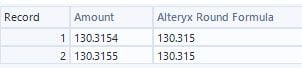
After some research on the community, I found the reason, which seems to be how Alteryx stores the values in a binary format. There was a pretty complicated explanation of why that you can see here if you really want to know.
https://community.alteryx.com/t5/Alteryx-Designer-Desktop-Discussions/Alteryx-Odd-Behavior/td-p/89086
On this other post, https://community.alteryx.com/t5/Alteryx-Designer-Desktop-Discussions/Rounding-Discrepancies/td-p/501512 there was a possible solution that worked most of the time. It's an ingenious way to resolve the issue, but I was confused as to why this remains an issue for Alteryx.
If you are working with data where the rounding in the last decimal place is not important, you can likely just rely on the Alteryx round formula. I have worked with many CFOs in the past, however, and know that any detectable "error" will bring into question everything else in your analysis. Due to this, I developed a macro, which is really just a formula tool, but I set it up as a macro to be able to share with others who may not want to change the formula tool to meet their needs every time.
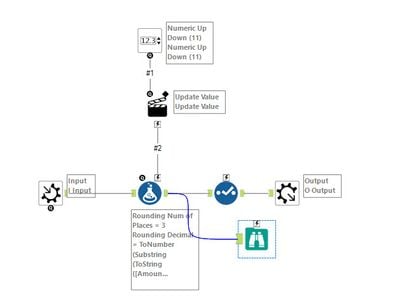
The included macro has a browse tool in it as well to display how it is working and comparing to the results provided by Alteryx's Round() expression. The build design is simple (which rounding should be), but instead of using the number as a number, I break it down into its components.
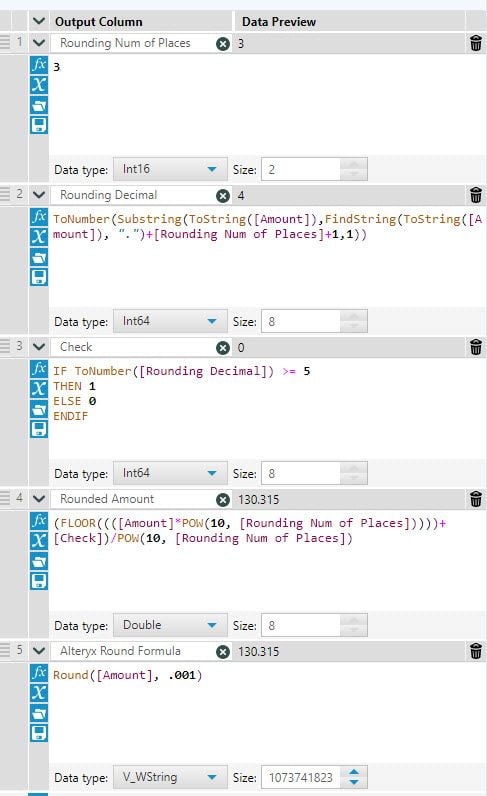
First, I set the number of decimals to round to. Next I convert the number into text. This way, I can pull the specific digit that the rounding is based upon. Using this digit, I can manually test if it is 5 or more (round up) or less than 5 (round down). This is what you would have to do if manually rounding each number by hand.
After that, I am pulling the part of the number that precedes the rounded digit. This was done by using the Floor() expression of the original amount times 10 to the power of the number of rounding places. So 2 decimal rounding would be times 100, 3 times 1000, and so on. Finally, I add a 1 (round up) or 0 (round down) based on the rounding test times 10 to the power of the number of rounding places. In the data included in the macro, you can see this would add .001 for the amounts where the rounding would round up.

I'm curious if anyone who has experienced this rounding issue in the past could run the macro against the data to see the results. I am pretty confident though that this method will provide 100% accuracy on rounding where other methods seem to fail.
Enjoy! 😀


