In case you missed the announcement: The Alteryx One Fall Release is here! Learn more about the new features and capabilities here
ACT NOW: The Alteryx team will be retiring support for Community account recovery and Community email-change requests Early 2026. Make sure to check your account preferences in my.alteryx.com to make sure you have filled out your security questions. Learn more here
Start Free Trial

Alteryx Designer Desktop Discussions

Find answers, ask questions, and share expertise about Alteryx Designer Desktop and Intelligence Suite.

Keep string with double quotes showed in Notepad CSV output

Lichunhuang
7 - Meteor

Hi everyone, I have a question about CSV file.

In my original CSV file, string is double quotes, but Integer is not. While output the csv file, in output option, it can only select "always" to add double quotes in every cells, or "No" to remove all double quotes. Is there any way to keep the same format showed in Notepad as the original CSV file? Thank you!

There is the output I want:
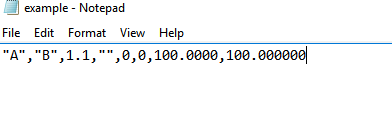
 

Lichunhuang_0-1630689764076.png


11 REPLIES 11
Lichunhuang
7 - Meteor

The fields contained comma are in double quotes. while using @danilang  's solution, it requires to select "No" in Quote output field, and that causes the error. Which means it cannot fix the string that contains comma.

Luke_C
17 - Castor
17 - Castor

Ah I see, that's tricky. The only solution I could think of would be to append a comma to each field (except the last) and output with the delimiter as \0 (as in no delimiter). 

Labels
Top Solution Authors