Hello
I have 2 data streams I am combining using the 'Union' tool to derive 'day on day' movements.
In the attached example workflow, staring with 'Join'
'Join L' is my 'Day1' data consisting of Products (metals), 'Spread Used', 'Tenor' 'Positions and 'Provisions'
'Join R' is my 'Day -1' data with the same columns as 'Day1' but 'tenor', 'spread', 'positions' and 'provisions' are different values.
Join output 'L' and 'R' are modified before all 3 streams (L,J, R) are combined in my 'Union'. The incoming 3 union streams look good (although one row is [Null]?)
The issue is with my output where the products with the (D-1) data shows as [Null]. I've somehow created another 'Product' column also on the far right of my preview screen.
How do I remove all the [Null's] in the first column 'Product' (and not have the last 'Product' column appearing) so I can then summaries my data.
The below highlighted text is what I want to be showing in the first column.
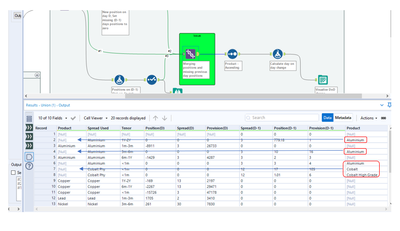
You can see in the 'output' (Visualize DoD change) from my attached workflow that I have created 2 'Product' columns showing [Null] values I want to remove.
Thanks for your assistance!
Sures


