The Alteryx Community is a finalist in three 2026 CMX Awards! Help us win Customer Support Community, Most Engaged Community, and User Group Program of the Year - vote now! (it only takes about 2 minutes) before January 9.
ACT NOW: The Alteryx team will be retiring support for Community account recovery and Community email-change requests Early 2026. Make sure to check your account preferences in my.alteryx.com to make sure you have filled out your security questions. Learn more here
Start Free Trial

Alteryx Designer Desktop Discussions

Find answers, ask questions, and share expertise about Alteryx Designer Desktop and Intelligence Suite.

Join two columns on multiple values and combine them in one cell in excel

SouravKayal
Asteroid

HI Team,


I have a data set that i need to merge.


Data set 1


ID

1

2

3

4


Data Set 2


IDNames
1Alpha
1Beta
2Gamma
3Test
3Alpha
4Test1
4Beta
4Gamma
4Alpha


Desired Output:


IDNames
1
  • Alpha
  • Beta
2Gamma
3
  • Test
  • Alpha
4
  • Test1
  • Beta
  • Gamma
  • Alpha


Appreciate if someone can help me in the right direction.

10 ANTWORTEN 10
Jay-RDC
Asteroid

Hi, Join Tool should work and just join them by ID.

SouravKayal
Asteroid

Join tool will get them in different rows i want to show them under 1 row if multiple values seprated by bullets or a delimiter

cjaneczko
Pulsar

You can use a Summary Tool and group by ID and Concatenate by Name. You only need Dataset 2 in this instance. I dont think you can use a bullet, but you can use any other delimiter you can think of.

SouravKayal
Asteroid

can you help with a test workflow ?

MilindG
Quasar
cjaneczko
Pulsar

Add a sort tool after it if you want the ID's in order. 

image.pngimage.pngimage.png

Raj
Nebula

@SouravKayalare you looking for output in PDF output or Xlsx format.
have you explored reporting tools?

cjaneczko
Pulsar

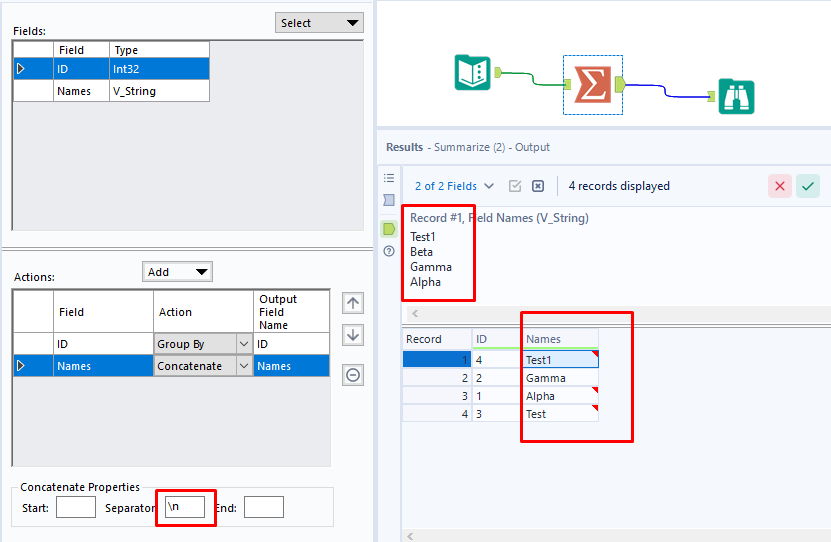
If its in excel you can also use \n in stead of the comma as the separator and it will put a Carriage return inside the cell and present it just like you have it, less the bullet. 


image.png

Jay-RDC
Asteroid

@cjaneczko Solution should work for you. If you need the bullet point format you would need to add a condition for that to separate 1 entry vs multiple. An output tool might not work for the bullet point format so better use table tool (add the condition/logic here for the bullet point) then render tool for your output.

Beschriftungen
Top-Lösungs-Autoren