- Community
- :
- Community
- :
- Participate
- :
- Discussions
- :
- Designer Desktop
- :
- Re: JSON Error - Not reading in all data
Options
- Subscribe to RSS Feed
- Mark Topic as New
- Mark Topic as Read
- Float this Topic for Current User
- Bookmark
- Subscribe
- Printer Friendly Page
Turn on suggestions

Auto-suggest helps you quickly narrow down your search results by suggesting possible matches as you type.
Showing results for
JSON Error - Not reading in all data
SOLVED
07-17-2016
03:50 PM
- Mark as New
- Bookmark
- Subscribe
- Subscribe to RSS Feed
- Permalink
- Report Inappropriate Content
07-17-2016
03:50 PM
JSON Error - Not reading in all data
Hi everyone,
I'm trying to input a json file which is a union (I think) of a number of different webpages which have been scraped. My issue is that only the first of these pages seems to be coming through and I also receive a warning message:
Input Data (1) Error message: The document root must not follow by other values. at character position: 143856
I have a csv file which contains the same data and I can see that this has all of the pages. The reason I'm using the json file rather than the csv is so that I can keep the column headers from each page.
Separately, this has all come about because I was unable to correctly parse the page directly through Alteryx. This is also included in the sample workbook in case anybody would like to look at that as well!
Thanks
DB
Solved! Go to Solution.

JSON Test.yxzp

Labels:
6 REPLIES 6
07-17-2016
03:50 PM
- Mark as New
- Bookmark
- Subscribe
- Subscribe to RSS Feed
- Permalink
- Report Inappropriate Content
07-17-2016
03:50 PM
JSON Error - Not reading in all data
Hi everyone,
I'm trying to input a json file which is a union (I think) of a number of different webpages which have been scraped. My issue is that only the first of these pages seems to be coming through and I also receive a warning message:
Input Data (1) Error message: The document root must not follow by other values. at character position: 143856
I have a csv file which contains the same data and I can see that this has all of the pages. The reason I'm using the json file rather than the csv is so that I can keep the column headers from each page.
Separately, this has all come about because I was unable to correctly parse the page directly through Alteryx. This is also included in the sample workbook in case anybody would like to look at that as well!
Thanks
DB
Solved! Go to Solution.
JSON Test.yxzp
Labels:

07-17-2016
07:48 PM
- Mark as New
- Bookmark
- Subscribe
- Subscribe to RSS Feed
- Permalink
- Report Inappropriate Content
07-17-2016
07:48 PM
Re: JSON Error - Not reading in all data
Hi @DataBlender,
Your JSON file is indeed a whole lot of JSON files unioned, but that is easy enough to deal with. Bring it in and configure the input tool as CSV with no delimiter:
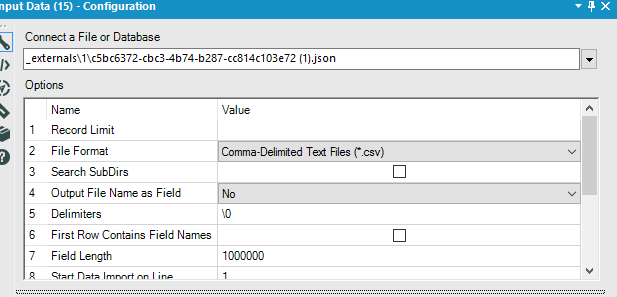
Then add a recordID and put it through the JSON Parse tool. Note that your schema changes after record 406 and so you might want to split on that before cross-tabbing your results.
Kane
07-17-2016
08:59 PM
- Mark as New
- Bookmark
- Subscribe
- Subscribe to RSS Feed
- Permalink
- Report Inappropriate Content
07-17-2016
08:59 PM
Re: JSON Error - Not reading in all data
Thanks @KaneG!
Reply
Loading...

11-24-2016
04:41 AM
- Mark as New
- Bookmark
- Subscribe
- Subscribe to RSS Feed
- Permalink
- Report Inappropriate Content
11-24-2016
04:41 AM
Re: JSON Error - Not reading in all data
Had the exact same issue as DataBlender - great solution, thanks!
Reply
Loading...

07-30-2019
04:00 PM
- Mark as New
- Bookmark
- Subscribe
- Subscribe to RSS Feed
- Permalink
- Report Inappropriate Content
07-30-2019
04:00 PM
Re: JSON Error - Not reading in all data
Hi! I tried the similar method yet the nested JSON data was lost during the process. As you can see in the output after Transpose, the attribute returns all null values. Is there anyway to fix this? Thanks a lot in advance!
Converse JSON file.yxzp
business.json.txt
Reply
Loading...
07-31-2019
12:50 AM
- Mark as New
- Bookmark
- Subscribe
- Subscribe to RSS Feed
- Permalink
- Report Inappropriate Content
07-31-2019
12:50 AM
Re: JSON Error - Not reading in all data
You'll have to set the Input Tool: "Field Length" to a high enough value that it does not truncate the values. Also de-select the "First Row Contains Field Names" checkbox.
With this data, I would also advise playing around with the dynamic Select in order to separate the attributes fields
07-31-2019
05:58 AM
- Mark as New
- Bookmark
- Subscribe
- Subscribe to RSS Feed
- Permalink
- Report Inappropriate Content
07-31-2019
05:58 AM
Re: JSON Error - Not reading in all data
Thank you so much!!! Looks like I overthink this problem way too hard haha
Will see what I can do with Dynamic Select! Really appreciate your help!
Reply
Loading...

