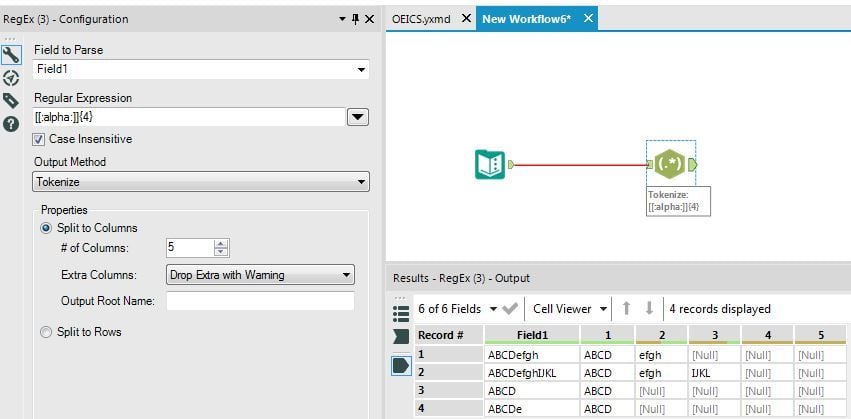
Situation: Strings that are 4 characters long are getting concatenated into one sting in a single column due to insufficient controls during data input. For example: 'ABCDwxyz' should instead be split into 'ABCD' and 'wxyz'
Sometimes 2 strings are concatenated, sometimes more. For example, 4 strings concatenated might look like this: 'ABCDwxyzLMNOefgh'
Using the following function (followed by a Text to Column tool, using a space as the delimiter) allows me to correct for this, but seems really crude:
IF
[Site Len] = 8
THEN Substring([No 5th char],0, 4) + " " + Substring([No 5th char],4,4)
ELSEIF
[Site Len] = 12
THEN Substring([No 5th char],0, 4) + " " + Substring([No 5th char],4,4) + " " + Substring([No 5th char],8,4)
ELSEIF
[Site Len] = 16
THEN Substring([No 5th char],0, 4) + " " + Substring([No 5th char],4,4) + " " + Substring([No 5th char],8,4) + " " + Substring([No 5th char],12,4)
ELSE 'Error'
ENDIF
I imagine there's a more elegant solution out there. Any ideas?
Here's a depiction of the input and desired output:
| Input | Output1 | Output2 | Output3 | Output4 |
| ABCD | ABCD | | | |
| ABCDwxyz | ABCD | wxyz | | |
| ABCDwxyzLMNOefgh | ABCD | wxyz | LMNO | efgh |