Hi,
Fairly new to Alteryx and running into the below issue.
I have a workflow that saves off an xlsx daily with a new date in the filename to a shared network drive.
\\network.drive\data\sub\directory\FILE NAME - 10-16-19.xlsx|||ReportSheetName
After this xlsx file is edited by the end-user I need to bring it in the same file with the same filename the next day to compare with current days data and do some edits.
Since the filename changes daily I have another workflow that creates and formats the date to the correct filename. The issue is, I am getting an “Error: Download (6): Error transferring data: URL using bad/illegal format or missing URL” when I try to bring in the file. If I copy the filename that Alteryx creates and paste it into a folder’s address bar the file will open in Excel.
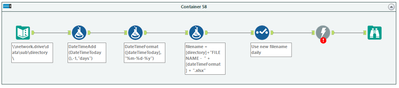
In the 3rd Formula, I am using the below for the filename to try and download:
[directory] = \\network.drive\data\sub\directory\
[directory] + "FILE NAME - " + [dateTimeFormat] + ".xlsx"
\\network.drive\data\sub\directory\FILE NAME - 10-16-19.xlsx
I've also tried it with the workbook page in the filename:
[directory] + "FILE NAME - " + [dateTimeFormat] + ".xlsx|||ReportSheetName"
\\network.drive\data\sub\directory\FILE NAME - 10-16-19.xlsx|||ReportSheetName
It seems like I'm missing something that is probably very easy to resolve.
TIA,
Rick


