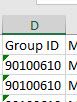
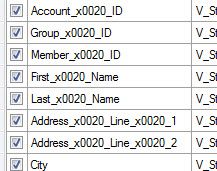
I am using the input tool to open a single sheet Excel workbook and seeing the character string _x0020 embedded between field names where the underscore was used. The data also shows similar insertions.
The display is the same for multiple files opened, whether via drag-n-drop or selecting the file from within the File Input Tool.
Any ideas what this is and how to correct for it?
¡Resuelto! Ir a solución.
I'm not sure of the cause but I do know of a solution. Use the Dynamic Rename tool -> Rename Mode: Formula -> Select all affected fields -> use this formula: Replace([_CurrentField_], 'x0020_', '')
That should clean up that weird string of characters
hi @rgusaas
Can you post a sample of the excel file with just a couple of rows of data. Delete all the columns except GroupID as well. It looks like the values in this column are affected as well.
Dan
Unfortunately, I am unable to pass any of the data on for review, and do not as yet know the root cause.
I did notice that the Excel file was Read Only, and that opening the Excel file, and doing a Save As to a Read Write eliminated the problem. The newly saved file did not have any of the extra characters embedded in either the labels or the data.
I was having the same issue. I found that if I change the File Format to Microsoft Excel Legacy (*xlsx) it fixed the issue.