In case you missed the announcement: The Alteryx One Fall Release is here! Learn more about the new features and capabilities here
ACT NOW: The Alteryx team will be retiring support for Community account recovery and Community email-change requests Early 2026. Make sure to check your account preferences in my.alteryx.com to make sure you have filled out your security questions. Learn more here
Start Free Trial

Alteryx Designer Desktop Discussions

Find answers, ask questions, and share expertise about Alteryx Designer Desktop and Intelligence Suite.
SOLVED

If string contains a hyphen before the comma, change the hyphen into another character

erinylai
7 - Meteor

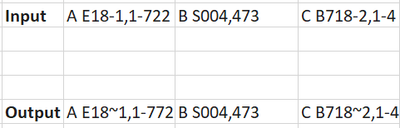
erinylai_0-1674845670067.png


Hi all - I am wondering what workflow to build to achieve the above desired output. Essentially I am trying to change the hyphen from the section before the comma since I want to eventually text to column the whole cell without messing up elements such as E18-1 and B718-2. 


Would appreciate any pointers! Thank you. 

6 REPLIES 6
binu_acs
21 - Polaris

@erinylai Two ways of doing this (Regex and String functions)


binuacs_0-1674848537211.png


binuacs_0-1674848619683.png


erinylai
7 - Meteor

Hi binuacs, thanks so much for your response! I tried incorporating into my workflow and I am encountering a few challenges since the full dataset has ~70k rows. How would you suggest that I modify the workflow to accommodate to the larger datasets? 


Thank you!! 

Luke_C
17 - Castor
17 - Castor

Hi @erinylai 


Not sure if your sample data is representative, but if it is you can try the replace first function: 

Luke_C_0-1674849997722.png


binu_acs
21 - Polaris

@Luke_C You made it so simple, I forgot about the ReplaceFirst function and made the formula too complicated 😀

binu_acs
21 - Polaris

@erinylai Can you upload some dummy data if possible?

erinylai
7 - Meteor

Hi binuacs, you helped me with the bigger question under another post so will close this out here. Thanks again! 

Labels
Top Solution Authors