In case you missed the announcement: The Alteryx One Fall Release is here! Learn more about the new features and capabilities here
ACT NOW: The Alteryx team will be retiring support for Community account recovery and Community email-change requests after December 31, 2025. Set up your security questions now so you can recover your account anytime, just log out and back in to get started. Learn more here
Start Free Trial

Alteryx Designer Desktop Discussions

Find answers, ask questions, and share expertise about Alteryx Designer Desktop and Intelligence Suite.
SOLVED

If/Then To combine two columns into one

NicoleMA
7 - Meteor

I can never seem to get these If/Then Statements right! I have one that should be pretty easy....and I don't know maybe if/then isn't even the right way to go?! I am open to suggestions if there is a better way to accomplish what I am trying to do!

In snapshot below you can see I have added two columns to indicate what kind of store it is....Non-Divest and Divest. I don't want to see these two columns though. I only want to see one column so I'm tyring to use the formula tool and an If/Then to add a column in that says "Store Type" and will indicate either "Non-Divest" or "Divestiture".
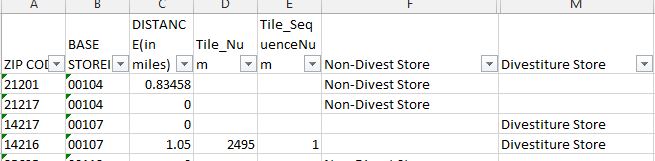
 

If-Then Two columns into one.JPG


 First Try:

IF Contains([Non-Divest Store],"Non-Divest Store") THEN "Non-Divest Store"  Elseif

[Divestiture Store],"Divestiture Store" then "Divestiture Store" ENDIF


Second Try:

If [Non-Divest Store]="Non-Divest Store" THEN "Non-Divest Store"  
ELSEIF [Divestiture Store]="Divestiture Store"" THEN "Divestiture Store"
ENDIF


Thanks in advance!!

3 REPLIES 3
MarqueeCrew
20 - Arcturus
20 - Arcturus
Max([Divestiture Store],[Non-Divesit Store])

A different approach for you.
Alteryx ACE & Top Community Contributor

Chaos reigns within. Repent, reflect and restart. Order shall return.
Please Subscribe to my youTube channel.
NicoleMA
7 - Meteor

Thanks!

tom_montpool
12 - Quasar

Thanks @MarqueeCrew for another way to do this frequent task...I hadn't thought to use Max().


In the interest of providing an answer using IF/THEN, here's what I would do:


If IsEmpty([Non-Divest Store]) Then [Divestiture Store] Else [Non-Divest Store] EndIf


@NicoleMA -- Your logic seems fine, but both of your examples are set up as IF...THEN...ELSEIF...THEN...ENDIF.


Correct syntax is either:

IF...THEN...ELSE...ENDIF

or

IF...THEN...ELSEIF...THEN...ELSE...ENDIF

Labels
Top Solution Authors