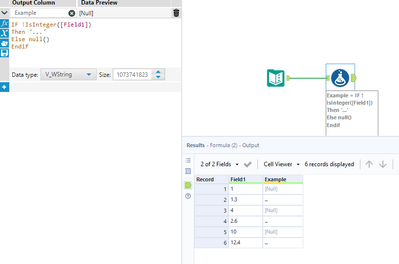
How do I write an IF statement in the formula tool that says IF a field is not a whole number, then the message will read "..." in the new column?
Hi @richleeb2
The IsInteger() function has you covered:
If your numbers are currently an integer, i.e. int32 or int64, use a select tool to change that column type of your number to a double.
If you have your number type as a double (decimals included) currently, then you could use a formula tool to say
If contains([number], ".") then "..."
else "whole"
endif
Hey @richleeb2, there's an IsInteger() check within Alteryx that we can use here. I don't know what you wanted to output if the record is a whole number but I've just output the number itself in that case (you can obviously change this):
This worked! But how do I get it to ignore null values?
From my testing my formula should already ignore null values, perhaps you can share what your expected results are in that case?
So if the Value field is either blank, null or a whole number, then nothing should show in Result column. Otherwise, I want it to show "Must be a whole number"
Update the ... in my example to "Must be a whole number" and youll have what you need.