ACT NOW: The Alteryx team will be retiring support for Community account recovery and Community email-change requests Early 2026. Make sure to check your account preferences in my.alteryx.com to make sure you have filled out your security questions. Learn more here
Start Free Trial

Alteryx Designer Desktop Discussions

Find answers, ask questions, and share expertise about Alteryx Designer Desktop and Intelligence Suite.

How to refer to changing column name

How do I select a column thats always column 2 but changes in name for the month we're in? Example: in december the name of the column in the excel file would be DEC_EXAMPLECOLUMN, and in january it would be JAN_EXAMPLECOLUMN. How would I make sure that my Alteryx workflow can still select the column despite the first 3 characters changing every month (maybe through using a RIGHT command)? Any help would be greatly appreciated!

4 ANTWORTEN 4
ShankerV
Castor

Hi @bramvanbaalen 


I will recommend this TIP/Trick to overcome the issue.


ShankerV_1-1675860822877.png


Many thanks

Shanker V

Could you provide some more context of what I should fill in the dynamic renaming tool? havent used that before

ShankerV
Castor

Hi @bramvanbaalen 


Post all your calculation, you can rename the column dynamically.

ShankerV_0-1675860987857.png

Explaining in detail:


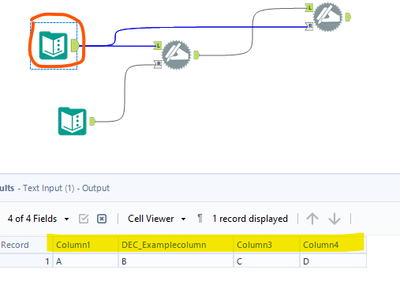
Step 1: Your Input file

ShankerV_1-1675861078565.png


Step 2:  My Text Input

ShankerV_2-1675861112295.png


I have used the Column1 

And column 2 name which will change as Changingcolumn


Step 3: When you use the dynamic rename tool, 

the column2 which ever it will be changed to Changingcolumn


So you can use those for all calculations, which will be common across the workflow.


Many thanks

Shanker V

binu_acs
Polaris

@bramvanbaalen One way of selecting the column name based on the current month name is with the help of the dynamic select tool


binuacs_0-1675870299498.png


Beschriftungen
Top-Lösungs-Autoren