In case you missed the announcement: The Alteryx One Fall Release is here! Learn more about the new features and capabilities here
ACT NOW: The Alteryx team will be retiring support for Community account recovery and Community email-change requests after December 31, 2025. Set up your security questions now so you can recover your account anytime, just log out and back in to get started. Learn more here
Start Free Trial

Alteryx Designer Desktop Discussions

Find answers, ask questions, and share expertise about Alteryx Designer Desktop and Intelligence Suite.
SOLVED

How to output to seperate sheets and append a date to the filename too !

saurabh79
7 - Meteor

Hi guys,

Not sure if this has been asked before but i could not find anything.


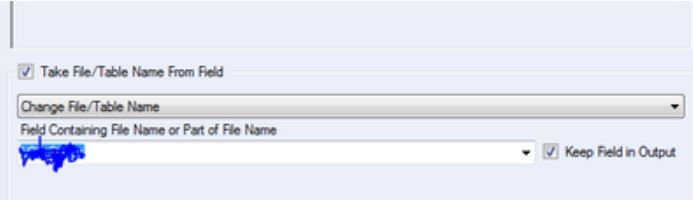
I have an excel sheet which has a column based off which my workflow creates a file with multiple sheets. As i will be running this workflow every week, what i would like to do is create a new file every time it runs with a date appended to the file whilst also outputting the different sheets in that file. Currently the output data tool, based on my limited knowledge only allows to either append date to a file or create multiple sheets but not both. Currently my output tool option looks like this:
 

Capture.JPG


Thanks in advance.


3 REPLIES 3
JosephSerpis
17 - Castor
17 - Castor

Hi @saurabh79 that is possible might be worth changing the dropdown to change the output tool to entire file path and before the output tool use a formula tool to create a filepath with a date inlcuded. like C:\Report\"weekly_Report"+"[Date]"+".xlsx|"+[Column]


Filepath.PNG

saurabh79
7 - Meteor

Thank you JS420. Is it possible to include a sample workflow showing how it would work? I did try your solution but i cannot seem to get it to work. Also, i noticed that the filepath in your solution isnt within " " and the date filed that is created is within " ".

Thanks again !

saurabh79
7 - Meteor

Hi Again,


I have fixed it. Just the location of the "" were giving the errors. But the solution suggested worked.


Thanks again.

Labels
Top Solution Authors