Hello Pros,
I am hitting a wall trying to figure this out and I am reaching out as a last resort.
Inputs
File1 - Excel file contains year-to-date amounts and includes many data fields (31). One field contains company codes and the file is grouped (sorted) according to company codes.
File2 - Excel template with 3 tabs. First two tabs are not to be changed and have formulas linked to the third tab called 'Alteryx Output'.
Outputs Required
Create a separate file for each company code. Each file should contain, in the 'Alteryx Output' tab, the data from File1 for just that company.
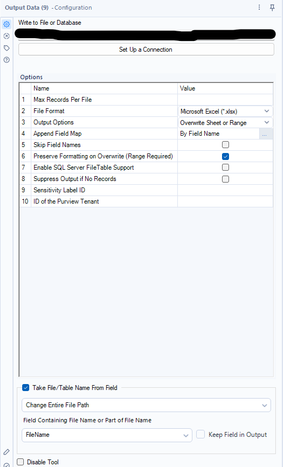
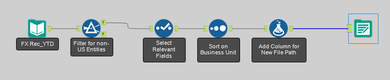
Below is the workflow I have thus far and the parameters I have selected for the Output tool. The workflow inputs File1, filters, selects relevant fields and adds a field for the new file name/path.
I am able to generate files for each company, however, the two standard tabs from File2 are not present. For some reason, they are not brought into each output file or are deleted? I've found discussions using Blob input/output and Batch Macro but I was unable to replicate it successfully. I think a Batch Macro may work but not sure if it is an overly sophisticated solution for this issue.
Thank you in advance for your help.
Skal
In this case, which is going to be a bit hard to describe, I like to:
I hope this makes sense. What you need is possible. I would read up on using Run Command Tool to help you accomplish the template copies and then look up outputting using "Batch Reporting" method.
Hope that helps, -Jay
Hi Jay,
Thank you for the explanation! I will look into the Run Command tool, then Batch reporting and return with any questions. I agree, I know this is possible, I just have to learn how to create the workflow once and I can then apply it in other use cases we have as well.
I will let you know how I do.
Thanks again,
Sachin
Hi @SkalTax
No need for run command here. @JosephSerpis wrote a blog about doing exactly this here: https://intersectionsandoverlaps.wordpress.com/2023/06/05/alteryx-excel-templates-with-blob-tools-an...
Here's a simplified version of the blog:
Hi Ollie,
A blog about Blobs is what I didn't know I needed. Thank you! I was trying the Blob input and output and kept getting an error on the input. The Blob blog looks promising. Thank you Ollie and thank you Joseph!
Kind Regards,
Sachin
Hi @OllieClarke,
I attempted the solution you suggested and I am very close. I keep getting the error shown below which I thought would be mitigated by the fact that I'm using Control Containers. The file for the first entity is generated perfectly using the template and keeping the desired standard tabs while adding the desired data to a specified range. All the other files that are generated only show the data in the specified range and not the standard tabs from the template.
The workflow creates a file using the template for the first group of data (the first entity) and then for all subsequent groups is unable to write the data to the template since it is 'being used'.
Any suggestions on how to fix this?
Thank you again for your help.
Kind Regards,
Sachin