ACT NOW: The Alteryx team will be retiring support for Community account recovery and Community email-change requests Early 2026. Make sure to check your account preferences in my.alteryx.com to make sure you have filled out your security questions. Learn more here
Start Free Trial

Alteryx Designer Desktop Discussions

Find answers, ask questions, and share expertise about Alteryx Designer Desktop and Intelligence Suite.

How to mapped one col from input file with output file

minakshi
6 - Meteoroid

Hello,

I am new to alteryx.


I have a one input file and a output file. 


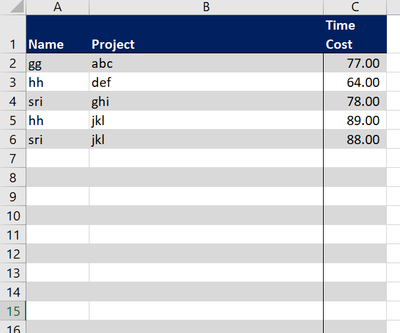
This is the sample input file.
minakshi_0-1624264175191.png


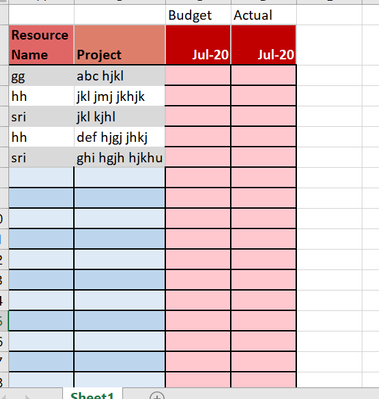
This is the output file -

minakshi_1-1624264230498.png


I need to fill the July 20 column under "Actual" of the output file from Time cost col of input file by looking up Name and project.


Suppose,If I find Resource name  and project name same in the output file then i need to update Time Cost amount col from input file in the July 20 column under "Actual" 


This process would be for monthly basis and output would be generated in the google spreadsheet.

For now, the output is for july 20 and next month need to do for august.


Can anyone suggest me on this?


3 REPLIES 3
Divyang21Arora
6 - Meteoroid

Hi @minakshi ,


I am attaching a workflow please refer to the flow to get your output. The output can be received on joining the two files on basis of the project name and resource name. The j anchor of the join tool gives you the output(refer to the workflow). 


Do let me know if this works. 

minakshi
6 - Meteoroid

Hi

@Divyang21Arora,


Output would generated in google spreadsheet. How to do that?

Also this task is for monthly basis. I don't want to go and rename the time cost col as Actual_MM/YYYY while joining two files. I just want to build a workflow in a way while I am running the workflow every month, output will generate in the google sheet.

Divyang21Arora
6 - Meteoroid

hi @minakshi ,


You can connect an output tool to the final result and configure it to google sheets. Go to the Data Source tab in the output (refer to image) and there you will find the option of google sheets. 

Divyang21Arora_0-1624272317661.png

For the dynamically naming part use the dynamic rename tool to rename the field base on the current month and year(write a formula for it) and the field will rename automatically when you run the flow to the current month and year. (refer to the attached flow). I have updated the flow.


Do let me know if this works. 


Labels
Top Solution Authors