In case you missed the announcement: The Alteryx One Fall Release is here! Learn more about the new features and capabilities here
ACT NOW: The Alteryx team will be retiring support for Community account recovery and Community email-change requests Early 2026. Make sure to check your account preferences in my.alteryx.com to make sure you have filled out your security questions. Learn more here
Start Free Trial

Alteryx Designer Desktop Discussions

Find answers, ask questions, and share expertise about Alteryx Designer Desktop and Intelligence Suite.

How to extract digits after a character using regex in formula tool

dizy_11
7 - Meteor

Hi all,


Hope you all are doing great!


I'm stuck with regex. I have attached a sample input data. What i basically need to do is in whatever string character "(" is present, i need to extract all the digits just after the character "," from the string else will print digit 0 in output if character "(" is not present. And there could be multiple digit also present after the character ",".


I have attached the sample input and the output which i want. 

Please help me how can i do this in formula tool by applying regex_replace() function.


Thanks for your help in advance!

2 REPLIES 2
Sebastiaandb
12 - Quasar

Hi @dizy_11 ,


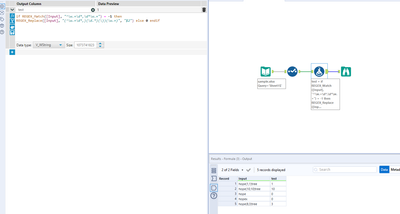
Here you go!


Sebastiaandb_0-1639550675439.png


Let me know if that works for you :-).


Greetings,


Seb


PhilipMannering
16 - Nebula
16 - Nebula

You can use the Regex Tool set to parse with expression,

,(\d+)


And then use the impute tool to fill in the zeros. Solution attached.


PhilipMannering_0-1639574687890.png


Labels
Top Solution Authors