The Alteryx Community is a finalist in three 2026 CMX Awards! Help us win Customer Support Community, Most Engaged Community, and User Group Program of the Year - vote now! (it only takes about 2 minutes) before January 9.
ACT NOW: The Alteryx team will be retiring support for Community account recovery and Community email-change requests Early 2026. Make sure to check your account preferences in my.alteryx.com to make sure you have filled out your security questions. Learn more here
Start Free Trial

Alteryx Designer Desktop Discussions

Find answers, ask questions, and share expertise about Alteryx Designer Desktop and Intelligence Suite.

How to concatenate

nmotiani
7 - Meteor

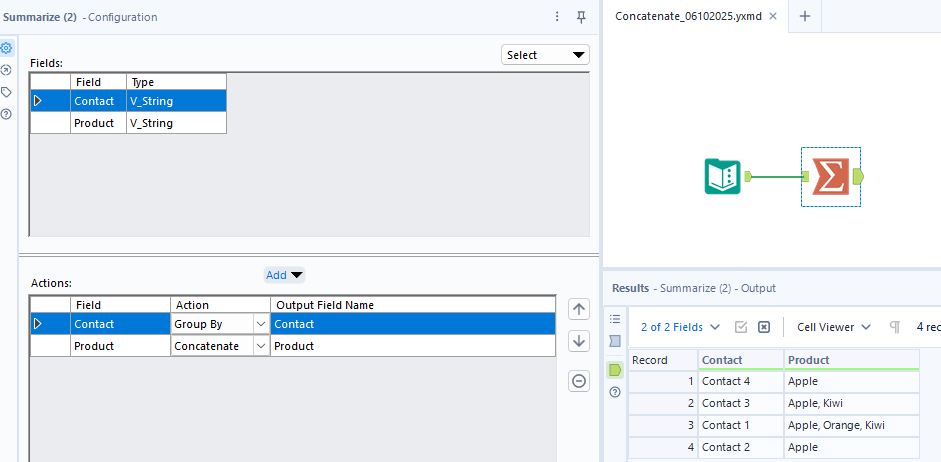
if one contact has multiple products how to concatenate in alteryx. Please help me build a workflow


for example:


ContactProduct
Contact 1Apple
Contact 2Apple
Contact 1Orange
Contact 3Apple
Contact 1Kiwi
Contact 3Kiwi
Contact 4Apple


Desired Output:

ContactAll Products
Contact 1Apple, Orange Kiwi
Contact 2Apple
Contact 3Apple, Kiwi
Contact 4Apple
4 REPLIES 4
JosephSerpis
17 - Castor
17 - Castor

Hi @nmotiani you can use the Summarise tool to concatenate. 

Screenshot 2025-10-06 151119.png

alexnajm
19 - Altair
19 - Altair

100% agreed with @JosephSerpis ^

aatalai
15 - Aurora

agree with @JosephSerpis but might add a sort after the summarise to have the data in order

dreldrel
9 - Comet

Just a small thing to add on - in the summarise tool, you can specify the delimiter at the bottom of the config window

Labels
Top Solution Authors