ACT NOW: The Alteryx team will be retiring support for Community account recovery and Community email-change requests Early 2026. Make sure to check your account preferences in my.alteryx.com to make sure you have filled out your security questions. Learn more here
Start Free Trial

Alteryx Designer Desktop Discussions

Find answers, ask questions, and share expertise about Alteryx Designer Desktop and Intelligence Suite.

How to align the column to middle

Sshasnk
Astéroïde

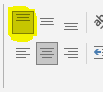
when I am trying to align the column to the center the alignment is coming as a center and top alignment but I want to change to top align to middle align.


Alteryx output:
 

Sshasnk_0-1672819640507.png


I want to change it into a middle alignment:

Sshasnk_1-1672819801689.png


Sample data to align to:


Fund account nameclass
ABC 123 AlexG
ABC 456 JoshF
ABC 846 JoshF
ABC 45 LeoG


11 RÉPONSES 11
davidskaife
Magnétar

Hi @Sshasnk 


You can use the Basic Table reporting tool to do this:

DavidSkaife_0-1672825305437.png


You have to configure each column separately like below:


DavidSkaife_1-1672825362674.png


If you also align the Dynamic or Unknown Fields then any new fields will automatically align as required.

@Sshasnk , Let me know which tool you are using for alignment.

Sapna Gupta
Sshasnk
Astéroïde

@grazitti_sapna I am using a table to align, but it is giving me top alignment and not middle 

Sshasnk
Astéroïde

@davidskaife  If you save it in excel and check the alignment it is not middle alignment. Alteryx is basically giving center-top allignment. Please see the screensot 

davidskaife
Magnétar

@Sshasnk 


What are you using to output the data? If you use the Render tool then it is aligned correctly.


DavidSkaife_0-1672826258270.png


@Sshasnk , you need to save the results using render tool only then you will be able to see the formatted data. 

Sapna Gupta
Sshasnk
Astéroïde

@davidskaife If you will see at the top of the toolbar ribbon on excel it is top-allign and not middle allign 

Sshasnk_0-1672828957871.png


It should be like this

Sshasnk_1-1672828995969.png


davidskaife
Magnétar

Hi @Sshasnk 


Ahhh, apologies, try this workflow. Bit more complex but your output is now fully aligned:


DavidSkaife_0-1672829971634.png


You create a Row Rule for the dummy header line, and use a formula to align vertically


DavidSkaife_1-1672830021956.png


Sshasnk
Astéroïde

@davidskaife  Sorry, This solution won't work because once I do a group by it will fail. I have already tried this solution already before posting my question

Étiquettes
Auteurs des meilleures solutions