In case you missed the announcement: The Alteryx One Fall Release is here! Learn more about the new features and capabilities here
ACT NOW: The Alteryx team will be retiring support for Community account recovery and Community email-change requests Early 2026. Make sure to check your account preferences in my.alteryx.com to make sure you have filled out your security questions. Learn more here
Start Free Trial

Alteryx Designer Desktop Discussions

Find answers, ask questions, and share expertise about Alteryx Designer Desktop and Intelligence Suite.
SOLVED

How to accumulate value in rows with given conditions and return value in each row?

gc-804
7 - Meteor

Hello,

I want to insert a Formula to accumulate the Amount for the same Member in the same Company and return the calculation result in each row. See example below. If the same Member changed to a different Company in any given period, the accumulation starts from 0 in the new Company. The expected results are placed in column "Accumulated".
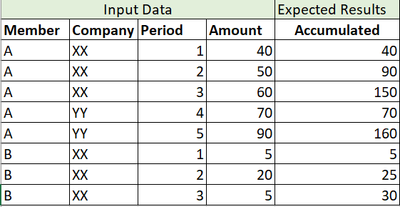
gc804_1-1661984645265.png


Could anyone help with this scenario without using macros?


Thank you in advance.


4 REPLIES 4
DataNath
17 - Castor
17 - Castor

Hey @gc-804, whilst this could be done with a Multi-Row Formula, the quickest way is to actually just use the Running Total tool. Within the configuration, you can set what you want this grouped by i.e. when to reset. The following gets you your desired output:


DataNath_0-1661986127500.png

Qiu
21 - Polaris
21 - Polaris

@gc-804 
The Running Total tool is exactly for this purpose. 😁

0901-gc-804.PNG

gc-804
7 - Meteor

This worked exactly the way I want. Thank you both so much for your help!!

Qiu
21 - Polaris
21 - Polaris

@gc-804 

Thank you for your feedback and good to know it works.

Labels
Top Solution Authors